Best Alert Systems for Deaf & Hard of Hearing Employees at Work (2026)
From desk-phone vibration alerts to warehouse-floor strobes, this is the complete guide to building a reliable alert system for deaf employees - what employers are required to provide, which devices actually work in professional settings, and how to put together a setup that keeps you informed without drawing unwanted attention.
- Why workplace alerting is different - and why it matters
- What employers are required to provide under the ADA
- Types of workplace alert systems explained
- Alert systems for open-plan and traditional offices
- Alert systems for warehouses, factories, and retail floors
- Alert tools for remote and hybrid deaf professionals
- Desk phone and meeting alert systems
- How to choose the right workplace alert system
- Requesting accommodations: how to make the case
- Setting up a workplace alert system: what to expect
- Your next steps
An alert system for deaf employees converts workplace sounds - desk phones, fire alarms, meeting calls, visitor doorbells, machinery alarms - into vibration or visual signals that can be perceived without hearing. The most reliable workplace setups combine a discreet, wearable receiver such as the Bellman Watch Receiver or a pocket-carried vibrating pager receiver with dedicated transmitters connected to a desk phone, fire alarm panel, or doorbell. Under the Americans with Disabilities Act, employers with 15 or more employees are generally required to provide this kind of alerting technology as a reasonable accommodation, at no cost to the employee, unless doing so would cause undue hardship.
Why Workplace Alerting Is Different - and Why It Matters
Home alerting systems are built around a stable, predictable environment: the same rooms, the same sensors, the same hours. The workplace is the opposite. A deaf or hard-of-hearing employee moves between an open-plan floor, a conference room, a desk phone, a break room, and possibly a warehouse or retail floor - often in a single day. Each of those settings has its own missed-alert risk, and most workplaces were never designed with any of them in mind.
This is the gap that an alert system for deaf employees is built to close. Rather than relying on a coworker to tap a shoulder or a phone screen that goes unnoticed in a pocket, a dedicated workplace alerting setup uses vibration and visual signals to deliver the same information a hearing colleague gets automatically - who's calling, whether the fire alarm has sounded, whether a meeting has started, whether someone is at the door.
The Job Accommodation Network (JAN), a service of the U.S. Department of Labor's Office of Disability Employment Policy, identifies alerting and notification devices as one of the most commonly requested and most effective accommodations for employees who are deaf or hard of hearing - and notes that most are low-cost relative to the productivity and safety benefit they provide. For employers, getting this right is not just a compliance matter; it is what allows a qualified employee to do the job safely and on equal footing with hearing colleagues.
The people who benefit most from a dedicated workplace alert system include:
- Deaf and hard of hearing employees in open-plan offices who cannot hear a desk phone or colleague calling their name
- Warehouse, manufacturing, and retail workers who need to detect safety alarms over ambient noise or from a distance
- Remote and hybrid professionals who need reliable alerting for video meetings and asynchronous communication
- Employees who are required to detect fire alarms, evacuation signals, or emergency announcements as part of basic workplace safety
- Anyone who has been relying informally on coworkers to relay alerts and wants a more independent, dignified solution
- HR and facilities teams building out formal accommodation infrastructure for current or future employees
This guide covers every major category of workplace alert system available in 2026, explains what the ADA actually requires of employers, and gives you a practical framework for building the right setup for your specific job - including the discreet, dependable hardware behind it: the Bellman Watch Receiver and Bellman pager receiver.
What Employers Are Required to Provide Under the ADA
The Americans with Disabilities Act (ADA) Title I requires employers with 15 or more employees to provide reasonable accommodations to qualified employees with disabilities, including hearing loss and deafness, unless doing so would impose an undue hardship on the business. Alerting and notification devices fall squarely within the category of accommodations the EEOC and JAN identify as both reasonable and typically low-cost.
What counts as a reasonable accommodation
For deaf and hard of hearing employees, reasonable accommodations commonly include: visual or vibrating alert systems for phones, alarms, and notifications; captioning services for meetings and calls; sign language interpreters where appropriate; assistive listening devices for in-person communication; and modifications to communication-heavy job duties where the modification does not eliminate an essential function of the role. Alerting hardware - wearable receivers, desk transmitters, visual strobes - is one of the most concrete and immediately actionable items on that list.
Who pays for it
Reasonable accommodations, including alerting devices, are generally provided at the employer's expense, not the employee's. Employers cannot require an employee to pay for or supply their own accommodation equipment. In practice, many employers work directly with the employee to identify a specific device - such as a wearable wristband receiver or a telephone alerting bundle - and purchase it directly as part of the interactive accommodation process.
Undue hardship is a specific legal standard, not a general cost concern. The EEOC defines it as significant difficulty or expense relative to the size, resources, and structure of the employer. For most alerting devices - typically in the low hundreds of dollars - undue hardship is rarely a successful defense for businesses of any meaningful size. Employers are expected to engage in good faith in the interactive process before concluding that an accommodation is not feasible.
The interactive process
Once an employee discloses a hearing-related limitation and requests an accommodation, the ADA requires an interactive process: a good-faith, collaborative conversation between employee and employer to identify an accommodation that effectively addresses the limitation. This does not need to be formal or adversarial. It typically starts with a conversation with a manager or HR representative, followed by research into specific solutions - often with input from resources like JAN or directly from accessible technology vendors.
For a complete breakdown of what employers must provide, how requests are evaluated, and what to do if a request is denied, see our dedicated guide: ADA Workplace Accommodations for Hearing Loss: What Employers Must Provide.
Types of Workplace Alert Systems Explained
Workplace alerting spans several distinct device categories, each suited to different job environments. Understanding which one fits your day-to-day setting is the foundation of choosing correctly.
Wearable Wristband Receivers
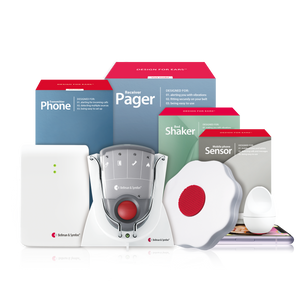
Worn like a watch, these receive RF signals from connected transmitters and vibrate when an alert occurs. Discreet enough for client-facing or formal office environments, and effective for desk-phone, meeting, and visitor alerts. The Bellman Watch Receiver is the leading dedicated option.
Pocket and Belt-Clip Pagers
A vibrating pager receiver that clips to a belt or sits in a pocket, ideal for warehouse, retail, and factory floor roles where a watch-style device might interfere with PPE or hands-on work. Connects to multiple transmitters with distinct vibration and LED patterns.
Fixed Visual Strobe Receivers
Desk- or wall-mounted units that flash when triggered - well suited to a personal workstation or a shared space like a reception desk. Useful as a secondary confirmation layer alongside a wearable device, particularly for fire alarm and emergency signals.
Software-Based Notification Tools
Captioning and visual-notification features built into video conferencing platforms, plus desktop and smartphone visual alerts for calendar reminders and messages. A genuinely useful supplement for remote and hybrid work, but not a substitute for dedicated hardware on safety-critical alerts like fire alarms.
Most effective workplace setups combine at least two categories: a wearable or pocket receiver for personal alerting, paired with software-based tools for meetings and messaging. Which combination makes sense depends heavily on the physical environment - office, warehouse, retail floor, or remote - covered in detail below.
Alert Systems for Open-Plan and Traditional Offices
Office environments present a specific alerting challenge: most signals - a ringing desk phone, a colleague calling your name across the floor, a knock at a glass-walled meeting room - are designed for casual, ambient hearing rather than a dedicated alarm. An effective office alert system for deaf employees needs to be discreet, professional in appearance, and able to handle several distinct signal types.
Open-plan offices
In open-plan layouts, the biggest risk is missing a desk phone ring or a colleague's attempt to get your attention from across the room. A wearable wristband receiver paired with a telephone transmitter connected to your desk phone resolves the phone-ring problem directly - the receiver vibrates the moment the phone rings, regardless of ambient noise or how far you are from your desk. For colleague-initiated alerts, a push-button transmitter placed at a desk or workstation entrance lets a coworker send a discreet vibration alert instead of relying on visual line of sight.
Traditional and private offices
In a private office, a fixed visual strobe receiver on the desk is a practical addition alongside a wearable device, since it does not require the device to be worn at every moment and provides a clear visual confirmation for anyone stepping into the office. This is also where fire alarm and building evacuation signals matter most - a workplace fire alarm transmitter connected to the building's alarm system, paired with the same wearable receiver, ensures evacuation alerts are never missed regardless of whether you are at your desk or in a meeting room.
For a complete breakdown of discreet alerting setups for open-plan layouts - including specific product configurations by office size - see: Open-Plan Office Alert Systems: Visual & Vibrating Options.
Alert Systems for Warehouses, Factories, and Retail Floors
Industrial and retail environments raise the stakes on alerting in a way that offices do not. Ambient noise from machinery, forklifts, or a busy sales floor makes audio-only alarms unreliable for hearing employees too - but the safety consequences of a missed alert fall hardest on deaf and hard-of-hearing workers if no alternative signal is in place.
Why pocket and belt-clip receivers work best here
A wristband receiver can be impractical in roles that involve gloves, machinery, or frequent handwashing. This is where a pocket or belt-clip pager receiver is generally the better fit - it delivers the same strong vibration and color-coded LED alert without sitting on the wrist, and can be paired with PPE without interference. Connected to a facility's fire alarm system, the receiver delivers a continuous vibration alert for as long as the alarm is active, rather than a single pulse that could be missed.
Safety-critical alerting takes priority
For warehouse and factory settings, the non-negotiable first transmitter is always a fire and safety alarm connection, followed by any facility-specific emergency signal - forklift reversing alarms, machinery fault alerts, or evacuation horns, where compatible sensor integration is available. Retail environments add a layer for register calls, manager pages, and stockroom or back-of-house communication, which can often be handled with a push-button transmitter system between departments.
Many warehouses and factories are required to maintain visual strobe components on fire alarm systems as part of building code and ADA compliance for public and employee-facing spaces. A personal wearable or pocket receiver should be treated as a complement to - not a replacement for - these facility-wide systems, since it ensures the alert reaches you specifically rather than relying on you being within sight of a fixed strobe.
For a complete guide to safety-specific alerting on the factory or warehouse floor, including how to integrate with existing facility alarm systems, see "Warehouse & Factory Floor Safety Alerts for Deaf Workers." For a closer look at receiver options across different industrial and retail settings, see: Best Vibrating Pagers for Office, Warehouse & Retail Use.
Alert Tools for Remote and Hybrid Deaf Professionals
Remote and hybrid work removes many of the physical alerting challenges of an office or warehouse, but introduces a different one: nearly all professional communication now happens through a screen, and missing a meeting notification or an urgent message has the same real consequence as missing a desk phone ring in an office.
Where software tools genuinely help
Most video conferencing platforms now include live captioning, visual call-incoming indicators, and desktop notification systems that can be configured to flash or display prominently rather than relying on a notification sound. Calendar and messaging apps with desktop or smartwatch notifications provide a reasonable first layer of awareness for meeting reminders and incoming messages during a remote workday.
Where dedicated hardware still matters
Software notifications share the same structural weakness in a home office as they do anywhere else: they depend on the device being awake, the app running, and a stable connection. For safety-critical alerts in a home office - a smoke alarm, a doorbell, an emergency call from family - a dedicated wearable receiver connected to home transmitters remains the more reliable layer, independent of laptop or software state. Many remote deaf professionals use the same Bellman alerting infrastructure for both home safety and work-related desk phone or video-call awareness, since the wearable receiver covers both contexts simultaneously.
For a dedicated deep-dive into remote work alerting strategies - including platform-specific captioning and notification settings - see: Remote Work Alert Tools for Deaf & Hard of Hearing Professionals.
Desk Phone and Meeting Alert Systems
Across nearly every workplace setting, two communication tools generate the most missed-alert risk for deaf and hard of hearing employees: the desk phone and the in-person meeting. Both deserve specific attention when designing a workplace alert system.
Desk phones
A telephone transmitter connects directly to a desk phone's ringer and relays the signal wirelessly to a wearable or pocket receiver the moment a call comes in. This works for traditional landline and DECT desk phones without requiring any change to existing office phone infrastructure, and it solves the most common single point of missed communication in an office setting.
Meetings and conference rooms
For in-person meetings, the alerting challenge shifts from detecting a ring to detecting that a meeting has started or that your presence is needed. A push-button transmitter placed near a meeting room entrance, paired with your wearable receiver, allows a colleague to send a discreet alert when a meeting is starting or when you are needed. For video meetings, enabling live captioning is the most effective accommodation for following spoken content in real time, and should be standard practice for any meeting a deaf or hard of hearing employee attends, whether or not they have requested it directly.
For a complete guide to desk phone and meeting alerting - including specific transmitter configurations for shared office phone systems - see: Desk Phone & Meeting Alert Systems for the Hearing Impaired.
How to Choose the Right Workplace Alert System
The right workplace alert system depends on your specific role, physical environment, and the signals that matter most to your day. Here is a practical framework for making the decision.
Step 1: Map your missed-alert risks
List every workplace signal you currently miss or are at risk of missing - desk phone, fire alarm, meeting start, colleague pages, machinery alerts. Be specific about your physical environment: a desk-based office role and a warehouse floor role have almost entirely different risk profiles, even within the same company.
Step 2: Match device type to job function
Client-facing and office-based roles generally favor a discreet wristband receiver. Hands-on, PPE-heavy, or industrial roles generally favor a pocket or belt-clip pager receiver. Desk-based roles in shared or open spaces often benefit from adding a fixed visual strobe receiver as a secondary confirmation layer.
Step 3: Prioritize safety-critical signals first
Fire alarms and building evacuation signals should always be the first transmitter connected in any workplace alerting setup, regardless of industry. Communication-convenience signals - desk phone, meeting alerts, colleague pages - are important for productivity and inclusion, but they should be added after the safety-critical layer is confirmed working.
Use this before requesting or purchasing a system
Confirm each point for any setup you are considering.
- Covers fire alarm and building evacuation signals first
- Matches your role - wristband for office, pocket pager for hands-on or PPE-heavy work
- RF-based transmission for reliable range across a floor or facility
- Distinct vibration or LED patterns to identify which signal triggered
- Discreet enough for your specific work environment
- Compatible with desk phone, push-button, and fire alarm transmitters
- Expandable - additional transmitters can be added as your role changes
- Comfortable and practical for a full workday
- Provided and paid for by the employer as part of a reasonable accommodation
- Confirmed working through a test alert before relying on it
Requesting Accommodations: How to Make the Case
Knowing what to ask for is only half the process. Making a clear, well-documented accommodation request gives both you and your employer the best chance of a smooth, fast resolution.
Start the conversation directly
A request does not need to use specific legal language to be valid - simply telling a manager or HR representative that you need a workplace adjustment related to your hearing is enough to begin the interactive process. That said, putting the request in writing, even briefly, creates a useful record and helps clarify exactly what is being asked for.
Be specific about the solution where possible
Requests that name a specific, reasonably priced solution - for example, a wearable receiver and a telephone transmitter for a desk phone - tend to move faster than general requests, since they remove ambiguity about what "accommodation" means in practice. If you are unsure what to request, the Job Accommodation Network (JAN) offers free, confidential guidance for both employees and employers on selecting appropriate solutions.
What to do if a request is denied or delayed
If an employer denies a reasonable accommodation request without engaging in the interactive process, or without a legitimate undue hardship justification, the employee may have grounds to file a charge with the EEOC. In most cases, however, delays are administrative rather than adversarial, and providing additional documentation or a more specific product recommendation resolves the issue without escalation.
For a complete, step-by-step walkthrough of how to phrase, document, and follow up on an accommodation request, see: How to Request Hearing Loss Accommodations at Work.
Setting Up a Workplace Alert System: What to Expect
Once a workplace alert system has been approved, setup is designed to be manageable without specialist technical support a meaningful advantage in a workplace where IT or facilities teams may have limited familiarity with assistive alerting hardware.
Step 1: Identify the highest-priority signal
Start with whichever signal carries the greatest safety or productivity risk almost always the fire alarm, followed by the desk phone. Confirm the building's fire alarm system and desk phone type with facilities or IT before purchasing transmitters, since compatibility details vary by system.
Step 2: Install transmitters and pair the receiver
Each transmitter fire alarm, telephone, push-button - connects to its source and pairs wirelessly with your wearable or pocket receiver. Test each connection individually by triggering the source signal and confirming the receiver responds with the correct vibration pattern.
Step 3: Document the setup for facilities and HR
Once the system is operational, share a brief summary with HR or facilities documenting which signals are now connected. This creates a record for future office moves, equipment replacement, or onboarding a new employee with similar accommodation needs.
Step 4: Review periodically
Office layouts, phone systems, and job duties change. Revisit the alerting setup whenever your role, desk location, or building systems change to confirm coverage is still complete.
In large open-plan offices or multi-floor facilities, RF range can be affected by distance and building materials such as concrete or metal partitions. If a receiver misses alerts in certain parts of a building, the most common fixes are repositioning the relevant transmitter closer to the area where you spend the most time, or adding a second fixed receiver in a high-traffic area as a backup. The Bellman support team can advise on configurations for larger commercial spaces.
Your Next Steps
An effective alert system for deaf employees is not a single device - it's a layered setup matched to your specific role, environment, and the signals that matter most to your safety and productivity. An office worker, a warehouse technician, and a remote professional each need a different combination of hardware and software, but the underlying principle is the same: close every gap between an auditory signal and your awareness of it.
The framework is straightforward: identify your highest-risk missed signals, start with safety-critical alerting, match the device to your physical work environment, and use the ADA's interactive process to get it funded and installed properly. That approach - anchored by a discreet Bellman Watch Receiver or a rugged Bellman pager receiver, depending on your role - represents the most reliable workplace alerting setup available for deaf and hard-of-hearing employees in 2026.
Build your system step by step
Work through these in order - each step closes a specific gap.
- List every workplace signal you currently miss or are at risk of missing
- Confirm your building's fire alarm and desk phone systems with facilities or IT
- Start the interactive accommodation process with a manager or HR
- Request a fire alarm transmitter as the first, non-negotiable connection
- Choose a wristband or pocket pager receiver based on your role
- Add a telephone transmitter for desk phone alerts
- Add a push-button transmitter for meeting and colleague alerts where needed
- Enable live captioning as standard practice for all video meetings
- Document the completed setup with HR and facilities for future reference
- Read the full guides in this cluster for deeper coverage of each work setting
Ready to build your workplace alerting system?
Explore the Bellman Watch Receiver, the pager receiver, and the full range of transmitters - all designed to work together for reliable, discreet alerting at work.

Sources: ADA.gov - Americans with Disabilities Act Title I: Employment · U.S. Equal Employment Opportunity Commission (EEOC) - Enforcement Guidance on Reasonable Accommodation and Undue Hardship; Hearing Disabilities in the Workplace · Job Accommodation Network (JAN) - Accommodation and Compliance: Employees Who Are Deaf or Hard of Hearing · National Institute on Deafness and Other Communication Disorders (NIDCD) - Hearing Loss Statistics; Assistive Devices for People with Hearing, Voice, Speech, or Language Disorders · Hearing Loss Association of America (HLAA) - Hearing Loss Facts and Statistics; Assistive Listening Devices · Bellman & Symfon - Product Documentation: Watch Receiver, Pager Receiver, Telephone Transmitter, Transmitter Range and Compatibility Specifications.
This article is for informational purposes only and does not constitute legal advice. Consult an employment attorney, your HR department, or the Job Accommodation Network for guidance specific to your situation.
More in This Series
ADA workplace accommodations for hearing loss: what employers must provide
A complete breakdown of employer obligations under the ADA, the interactive process, and what reasonable accommodations typically look like.
Best vibrating pagers for office, warehouse & retail use
A closer look at pocket and belt-clip receiver options across different professional environments.
How to request hearing loss accommodations at work
A step-by-step walkthrough of phrasing, documenting, and following up on a workplace accommodation request.
Open-plan office alert systems: visual & vibrating options
Discreet alerting configurations for open-plan and traditional office layouts of every size.
Remote work alert tools for deaf & hard of hearing professionals
Software and hardware strategies for staying aware of meetings, messages, and home-office safety signals.
Desk phone & meeting alert systems for the hearing impaired
Specific transmitter configurations for desk phones, conference rooms, and shared office phone systems.
Warehouse & factory floor safety alerts for deaf workers
Safety-critical alerting strategies for industrial environments, including facility alarm system integration.
Best Alert Systems for Deaf & Hard of Hearing Employees at Work (2026)
This guide breaks down the practical choices, features, and considerations behind this topic. Use it to identify a setup that fits the listener, the environment, and the everyday moments that matter most.
The featured products below are current Bellman options discussed in the article or closely matched to its use case.