Do Wireless TV Headphones Work With Hearing Aids?
Yes, but it depends on your hearing aids and the system you choose. This guide explains the three main ways wireless TV headphones can work with hearing aids, what to check before you buy, and which Bellman options give you the most flexibility.
- The short answer
- Three ways wireless TV audio can reach your hearing aids
- Option 1: Bluetooth streaming directly to your hearing aids
- Option 2: Neck loop with T-coil
- Option 3: Use headphones or earbuds instead of your hearing aids
- Which option is right for you?
- Bellman products that work with hearing aids
- Common questions answered
- Next steps
Wireless TV headphones can work with hearing aids in several ways. If your hearing aids have Bluetooth, the Maxi Pro TV Streamer can pair directly to them. If your aids have a T-coil (telecoil), the Bellman Neck Loop connects to a Bellman amplifier and sends audio wirelessly to your aids. And if you prefer to take your hearing aids out while watching TV, the Maxi Pro TV Listening System includes both headphones and earbuds that work independently of any hearing aid.
If you wear hearing aids, you might wonder whether wireless TV headphones are even worth looking at. After all, you already have devices helping you hear. Why add another?
The answer is simple. Hearing aids help you hear the world around you. But they don't always make TV dialogue clear enough. The volume that works for others in the room may still not be loud enough for you. And turning the TV up louder is not always an option, especially if someone else is in the room.
Wireless TV headphones, or a personal TV listening system, let you control your own volume. Independently. Without changing a thing for anyone else. The question is how to make that work alongside your hearing aids.
This guide covers exactly that.
The Short Answer
Yes, wireless TV headphones can work with hearing aids. But "work with" means different things depending on your situation. There are three main approaches, and each suits a different type of hearing aid user.
- Bluetooth hearing aids: stream TV audio directly from the TV streamer to your aids
- T-coil hearing aids: use a neck loop connected to a personal amplifier to send audio to your aids
- Any hearing aids: remove them for TV and use headphones or earbuds connected to a personal amplifier instead
Each option has real advantages. The right one depends on what your hearing aids can do and what kind of listening experience you want. We cover all three below.
Three Ways Wireless TV Audio Can Reach Your Hearing Aids
There is no single standard for how hearing aids and TV listening devices connect. The approach depends on the technology built into your aids. Here is a plain-English breakdown of your options.
Bluetooth streaming
Your hearing aids receive TV audio directly via Bluetooth. Works if your aids support Bluetooth audio streaming. The TV streamer pairs to your aids just like it would pair to a phone or amplifier.
T-coil via neck loop
A neck loop worn around your neck connects to a personal amplifier. Your hearing aids pick up the audio magnetically when switched to T-coil (T) mode. Works if your aids have a telecoil.
Headphones or earbuds instead
You remove your hearing aids and use the headphones or earbuds included with the Maxi Pro system. The amplifier handles sound processing. Works with any hearing aids, or none at all.
Not sure what your aids support?
Check your hearing aid manual or ask your audiologist. Look for "Bluetooth audio streaming" or "T-coil / telecoil" in the specs. If neither applies, the headphone option works for everyone.
Option 1: Bluetooth Streaming Directly to Your Hearing Aids

Many modern hearing aids support Bluetooth audio streaming. This means they can receive wireless audio the same way a pair of Bluetooth headphones would. If your aids have this feature, the Maxi Pro TV Streamer can pair directly to them.
How it works
The TV Streamer plugs into your television using a 3.5 mm, RCA, or optical (Toslink) cable. Once connected, it sends the TV audio wirelessly via Bluetooth. Your Bluetooth-compatible hearing aids receive that audio directly. You hear the TV through your aids at whatever volume you set. No headphones needed. No extra receiver to carry.
What to check
Not all hearing aids that have Bluetooth support audio streaming. Some only support Bluetooth for app control or remote adjustments. Check that your aids specifically support "Bluetooth audio streaming" or "direct audio streaming." Your audiologist or hearing aid documentation will confirm this.
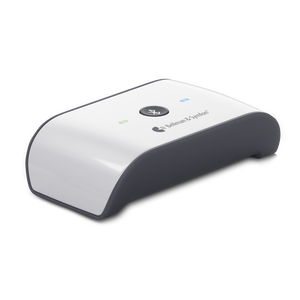
The Maxi Pro TV Streamer (BE2022) is confirmed compatible with Bluetooth-enabled hearing aids for direct audio streaming. It uses Qualcomm aptX low latency technology, which keeps audio in sync with the video on screen. Range is up to 80 ft line-of-sight. Inputs: 3.5 mm, RCA, and optical (Toslink). USB powered with adapter included.
The advantage
This option is the cleanest. No extra devices to wear. Your hearing aids do the work they already do, plus stream your TV audio directly. If you already own a Maxi Pro amplifier, you can add just the TV Streamer as a standalone purchase.
Option 2: Neck Loop With T-Coil
Many hearing aids, especially older models, have a feature called a telecoil or T-coil. It is a small copper coil inside the hearing aid that picks up magnetic signals. When you switch your aids to T mode, they receive audio from any compatible magnetic source, including a neck loop.
How it works
The Bellman Neck Loop (BE9159) is a lightweight loop you wear around your neck. It plugs into the 3.5 mm output of a Bellman personal amplifier. The amplifier receives the TV audio and sends it to the neck loop. The neck loop generates a magnetic field. Your hearing aids, switched to T mode, pick up that field and convert it back to sound. The audio goes directly into your aids.
What to check
Your hearing aids need a telecoil to use this option. Look for "T-coil," "telecoil," or "T mode" in your hearing aid documentation. Many behind-the-ear aids have a telecoil. Many in-the-ear aids do too, though smaller aids may not. Again, your audiologist can confirm in seconds.
The advantage
The neck loop lets the audio pass through your hearing aids as if it came from the room. Your aids still apply their own sound processing, volume adjustments, and any tuning your audiologist set up. You get amplified, processed TV audio delivered right through your aids. No headphones over your ears. No interference with your existing hearing aid fit.
Bellman amplifiers work with or without hearing aids. You can listen through headphones, earbuds, or a neck loop if your hearing aids have a Telecoil.
Bellman & SymfonOption 3: Use Headphones or Earbuds Instead of Your Hearing Aids
Some people prefer to take their hearing aids out while watching TV and use a personal amplifier with headphones instead. This is a perfectly valid approach. It is also the most universally compatible option because it works regardless of what hearing aid technology you have, or whether you wear hearing aids at all.
How it works
The Maxi Pro TV Listening System includes a personal amplifier, a TV streamer, stereo on-ear headphones with a mic, and discreet earbuds with a mic. The TV streamer plugs into your TV. The amplifier receives the audio wirelessly. You put on the headphones or earbuds and adjust the volume to whatever works for you. The amplifier also has digital noise reduction and up to 135 dB output, so even significant hearing loss is well supported.
When this makes sense
- Your hearing aids do not have Bluetooth streaming or a T-coil
- You find it more comfortable to remove your aids after a long day
- You want a system that works for multiple people, including those without hearing aids
- You want the clearest possible TV audio with maximum volume control
The advantage
You are not dependent on your hearing aid's features or battery. The Maxi Pro amplifier does its own sound processing. Up to 135 dB SPL output means it can reach volumes that many hearing aids cannot. And with up to 70 hours of battery life per charge, you will not be reaching for a charger mid-episode.
Which Option Is Right for You?
Use this table to find your starting point quickly.
Bellman Products That Work With Hearing Aids
Here is a clear look at the Bellman products relevant to hearing aid users, what each does, and which hearing aid scenario each fits.
Maxi Pro TV Streamer (BE2022)
Plugs into your TV and streams audio wirelessly. Pairs with the Maxi Pro amplifier or directly with Bluetooth hearing aids. Supports 3.5 mm, RCA, and optical inputs. 80 ft range. aptX low latency for lip-sync accuracy. $139.95.
Bellman Neck Loop (BE9159)
Connects to any Bellman amplifier via 3.5 mm jack. Worn around the neck. Sends audio to T-coil enabled hearing aids magnetically. Lightweight, fits under clothing. Compatible with Maxi Pro, Mino, Maxi Classic, and Domino Pro. $83.95.
Maxi Pro TV Listening System
Complete package: TV streamer, personal amplifier, on-ear headphones, and earbuds. Works with or without hearing aids. Up to 135 dB output, 70-hour battery, digital noise reduction. Best for users who want one complete solution. $329.95.
Maxi Pro Amplifier (standalone)
The amplifier unit only, without the TV streamer. Use with the neck loop for T-coil hearing aid compatibility, or with headphones and earbuds. Add the TV Streamer separately if needed. Works for conversations, phone calls, and TV.
Common Questions Answered
Will I need to remove my hearing aids to use the headphones?
If you choose the headphone option, yes. On-ear headphones are designed to sit against the ear, which can be uncomfortable or cause feedback with hearing aids underneath. Earbuds are smaller and may fit alongside some in-the-ear aids, but results vary. For the cleanest experience with hearing aids still in, use the Bluetooth streaming or neck loop option instead.
My hearing aids are Bluetooth but not for audio streaming. Can I still use the TV Streamer?
Not for direct audio to your aids. Some hearing aids use Bluetooth only for app control, not for receiving audio. In that case, use the neck loop option if your aids have a T-coil, or use headphones with the Maxi Pro system. The TV Streamer itself will still work fine connected to your TV. It just needs the Maxi Pro amplifier as the receiver instead of your aids.
Can two people use the same TV Streamer at the same time?
Yes. A second compatible receiver can pair to the same streamer. Each person controls their own volume independently. This is useful when two people in the same household have different hearing needs. For more on this, see our guide on TV listening for couples with different hearing needs.
Do I need to see an audiologist to set this up?
No. Bellman amplifiers and the TV Streamer are non-prescription devices. No fitting or clinic visit is needed. However, if you are unsure whether your hearing aids have Bluetooth audio streaming or a T-coil, your audiologist can confirm that in one quick question. It is worth asking before you buy.
Will the neck loop interfere with my hearing aids?
No. The neck loop is designed specifically to work with T-coil hearing aids. When your aids are switched to T mode, they pick up the magnetic signal from the loop. There is no interference. The loop is worn under your shirt if you prefer it to be out of sight.
Next Steps
The right setup depends on two things: what your hearing aids can do, and how you prefer to watch TV. Once you know those two things, the choice becomes straightforward.
- Bluetooth hearing aids: get the TV Streamer and pair direct to your aids
- T-coil hearing aids: get a Bellman amplifier + Neck Loop (BE9159)
- Neither or unsure: get the Maxi Pro TV System with headphones and earbuds
- Already have the Maxi Pro: just add the TV Streamer or Neck Loop as needed
- Two people with different needs: both can pair to the same streamer with separate volume control
- Want to learn more about TV listening options: see the full 2026 buyer's guide
Whatever setup you choose, the goal is the same. You hear the TV at the volume that works for you. Everyone else is unaffected. No more asking people to repeat what was said. No more missing punchlines or important plot moments.
Confirm these before you order
A few quick checks now will save a lot of back-and-forth later.
- Check if your hearing aids have Bluetooth audio streaming (not just Bluetooth control)
- Check if your hearing aids have a T-coil or telecoil feature
- Ask your audiologist if unsure about either of the above
- Decide: stream to aids (Bluetooth), send via neck loop (T-coil), or use headphones
- Check your TV's audio output ports: 3.5 mm, RCA, or optical
- If pairing Bluetooth aids: confirm they support audio streaming, not just app pairing
- If using neck loop: switch your hearing aids to T mode when using
- If using headphones: consider removing hearing aids for comfort
Find the right TV listening setup for your hearing aids
Shop the Maxi Pro TV System, the standalone TV Streamer, and the Neck Loop for T-coil compatible aids.
Sources: Bellman & Symfon product documentation: Maxi Pro TV Streamer (BE2022), Neck Loop (BE9159), Maxi Pro TV Listening System (BE8054), Maxi Pro Amplifier; Bellman & Symfon collections pages for personal hearing amplifiers and audio accessories.
This article is for informational purposes only and does not constitute medical advice. Consult a licensed audiologist or healthcare provider for a personalized hearing evaluation and treatment recommendations.
More in This Series
Best TV listening systems and wireless headphones for hard of hearing (2026)
The complete guide to every type of TV listening system and how to choose the right one.
Why can't I hear the TV clearly? Causes and fixes for hearing loss
Why TV dialogue is hard to follow even with hearing aids, and what to do about it.
Wireless TV headphones for seniors: complete buyer's guide
What older adults should look for when choosing a wireless TV listening solution.
TV streamer vs wireless headphones: connect to any TV
How a TV streamer and wireless headphones work together, and which ports your TV needs.
Best TV listening for couples with different hearing needs
How two people can watch the same TV at different volumes without disturbing each other.
Maxi Pro TV listening setup: step-by-step guide
Everything you need to plug in, pair up, and start watching clearly from day one.
A TV Setup That Works With Your Hearing Aids
Wireless TV headphones can work well with hearing aids, but fit, feedback, streaming technology, and your hearing-aid features all matter. Many people benefit from a system that delivers TV sound directly to their preferred listening accessory instead of relying on conventional over-ear headphones alone.
The Maxi Pro TV Listening System offers adjustable TV sound, while the Neck Loop is a practical option for listeners who use telecoil-equipped hearing aids.