Gifts for Seniors with Hearing Loss: Practical Alert Devices That Actually Help

The most thoughtful gift you can give a senior with hearing loss is not a louder alarm or a novelty gadget - it is a system that quietly ensures they never miss a doorbell, a smoke alarm, a phone call, or a knock on their door again. This guide covers every practical alert device worth giving, organized by situation, budget, and need.
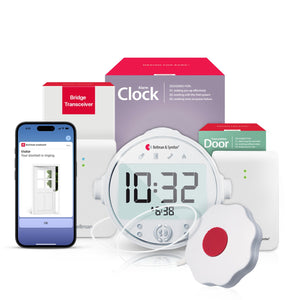
The most practical gifts for seniors with hearing loss are complete alert system bundles - a Bluetooth bridge paired with a watch receiver, a doorbell transmitter, or a smoke alarm transmitter - giving them silent, vibrating notifications for the events that matter most. The Bellman system delivers every household alert (doorbell, smoke, phone, push button, baby monitor) as a wrist vibration and a smartphone notification, with no Wi-Fi required and no monthly subscription fee. Bundles start with the most urgent safety need and expand from there.
Why Most Hearing Loss Gifts Miss the Point
Every year, well-meaning family members buy gifts for seniors with hearing loss that look thoughtful on the surface but do not actually solve the right problem. A set of high-volume TV headphones. A flashing phone ringer that only covers one room. A novelty amplified telephone with enormous buttons. These gifts address the obvious frustration - sound is harder to hear - but they do not address the underlying safety and independence issue: a senior living with hearing loss is surrounded by home alert systems designed for people who can hear, and those systems are quietly failing them every day.
The smoke alarm that will not wake them at night. The doorbell they cannot hear from the back of the house. The phone call from their doctor that rings unanswered. The push button they cannot press fast enough to call for help from another room. These are not comfort issues. They are safety and independence issues. And the gifts that actually help are the ones that close those gaps with technology specifically designed for people who are deaf or hard of hearing.
This guide focuses on those gifts - the alert devices and alert systems that address real household safety gaps, that are genuinely easy to set up, and that the senior in your life will actually use every day. For each gift, we explain what it does, why it matters, and who it is right for.
Before You Buy: How to Choose the Right Gift
The right gift depends on the specific person's situation: how severe their hearing loss is, whether they live alone, what their most pressing unmet safety need is, and how comfortable they are with technology. A few questions help narrow it down quickly.
Do they live alone?
For seniors living alone, fire safety alerting at night is the most urgent priority. No one else in the home will hear the smoke alarm if they cannot. Start there before considering convenience-oriented gifts.
Do they remove hearing aids at night?
Nearly all seniors do. This means their home's entire sound-based alert infrastructure - smoke alarms, carbon monoxide detectors, the doorbell - effectively goes silent every night. Nighttime coverage requires a bed shaker and Alarm Clock Receiver, not just a louder ringer.
Are they missing important phone calls?
Missed calls from doctors, pharmacies, and family members are a major frustration and a real health risk for seniors with hearing loss. A phone alert that vibrates a wrist-worn watch anywhere in the home solves this completely.
Do they miss the doorbell?
Missed deliveries, family visits, and service appointments are daily frustrations for people who cannot reliably hear the front door from inside the home. A doorbell alert transmitter paired with a Watch Receiver eliminates this gap entirely.
Do they have a caregiver or family member nearby?
For seniors who live with or near family, a push button call system gives them a dignified, private way to signal for help or attention without shouting across the house - a small thing that makes a big difference in day-to-day dignity.
Do they already have part of a system?
If your recipient already owns a Bellman Bridge, the best gift may be an additional transmitter - a doorbell, smoke alarm, or phone transmitter that expands their existing setup without buying hardware they already have.
The Best Alert Device Gifts for Seniors with Hearing Loss
The gifts below are organized by use case and urgency. Each includes what it does, who it is best for, and why it stands out. All are part of the Bellman system, which means they share a single Bridge, Watch, and app - no fragmented learning curve, no extra devices to manage.
Smoke & Fire Alert Bundle with Alarm Clock
Life-Safety First
The most important gift on this list. The Bridge + Smoke + Alarm Clock bundle includes the Bluetooth Bridge, a Smoke Alarm Transmitter, and an Alarm Clock Receiver with a 100 dB alarm, flashing strobe light, and a bed shaker pad - designed specifically to rouse a deep sleeper who has removed their hearing aids. When the smoke alarm activates, all three outputs fire simultaneously.
Best for: Any senior who lives alone and removes their hearing aids at night. Add the Watch Receiver separately for daytime wrist alerts from the same Bridge.
Doorbell Alert System with Bridge & Watch Receiver
Top Seller
The Bellman Doorbell System with Bluetooth Bridge and Watch Receiver is the most popular starting point for seniors new to vibrating alert technology. It includes the Bridge, a Doorbell Transmitter that clips near the existing doorbell chime, and the Watch Receiver - no rewiring, no tools, no new hardware. The Watch vibrates with a visitor icon the moment someone rings the bell, wherever in the home the person is.
Best for: Seniors who frequently miss the doorbell (missed deliveries, visitors left waiting) and would benefit from a wearable alert. Works as a foundation for adding more transmitters later.
Doorbell Alert Bundle with Alarm Clock
Night Safety
The Bridge + Doorbell + Alarm Clock bundle routes doorbell alerts through the Alarm Clock Receiver on the nightstand - meaning a ring at the front door triggers the 100 dB alarm, strobe light, and bed shaker even at 2 a.m. with hearing aids removed. Ideal for seniors who receive early-morning deliveries or who need to be aware of nighttime visitors (home health aides, family members).
Best for: Seniors expecting scheduled overnight or early-morning visitors, or anyone for whom both day and night doorbell coverage is important. Add the Watch Receiver for daytime wrist coverage.
Phone Alert System with Bridge & Watch Receiver
Never Miss a Call
The Bellman Phone System with Bluetooth Bridge and Watch Receiver connects directly to the landline via a built-in RJ11 input and detects incoming calls electrically - not by sound - delivering a wrist vibration and phone icon the moment a call arrives. Mobile calls are forwarded automatically through the Bellman Assistant app. No more missed calls from doctors, pharmacies, or family members.
Best for: Seniors who live alone and frequently miss calls, or who have expressed frustration about not hearing the phone ring in time. Covers both landline and mobile in one setup.
Push Button Call System with Bridge & Watch Receiver
For Dignity & Safety
The Bellman Push Button System with Bluetooth Bridge and Watch Receiver gives a senior a small, wearable push button pendant they can press anywhere in the home to send an immediate vibration alert to a caregiver's or family member's Watch Receiver. It is a dignified alternative to shouting across the house, and doubles as a call-for-help signal for situations where they cannot reach a phone.
Best for: Seniors who live with or near family members or a caregiver and need a quiet, discreet way to signal for attention. The push button is worn as a pendant or placed on a table - no fumbling with a phone.
Push Button Alert Bundle with Alarm Clock
Nighttime Caregiver
The Bridge + Push Button + Alarm Clock bundle ensures that a push button pressed during the night - when a senior needs help but cannot reach a phone - activates the Alarm Clock Receiver with 100 dB alarm, strobe light, and bed shaker in the caregiver's or family member's bedroom. Designed for in-home caregiving arrangements where the caregiver may be asleep and needs to be roused by the alert.
Best for: In-home caregivers or family members who sleep in a different room and need to be woken for nighttime assistance requests. The Push Button travels with the senior; the Alarm Clock Receiver stays on the caregiver's nightstand.
Baby Monitor System with Bridge & Watch Receiver
For Grandparents
The Bellman Baby Monitor System with Bluetooth Bridge and Watch Receiver uses a Baby Sound Transmitter with adjustable sensitivity placed in the child's room. When the baby cries or makes sounds above the set threshold, the Bridge delivers an instant wrist vibration with a baby icon - no audio feed needed. The grandparent knows to check in without needing to hear the monitor's audio.
Best for: Hard-of-hearing grandparents who babysit regularly, or parents with hearing loss caring for an infant. Works with the existing Bridge if one is already in the home - just the Baby Transmitter needs to be added.
Bellman Watch Receiver (Standalone)
Expand Any System
The Bellman Watch Receiver can be purchased standalone for households that already own a Bluetooth Bridge but are missing the wearable wrist component. It pairs with any existing Bridge and immediately adds whole-home wrist vibration alerts for every transmitter already connected - doorbell, smoke, phone, push button - with up to 650 feet of Bluetooth range and up to a week of battery life per charge.
Best for: Seniors who already have the Bellman Bridge setup but rely only on fixed receivers (like lamp flashers) or the app. The Watch makes the system portable and truly whole-home.
Matching the Right Gift to the Occasion
The best gift is not just the most useful device - it is the device that fits the moment, the relationship, and what you know about the recipient's life situation. The following matches common gifting occasions to the most appropriate alert device.
| Occasion / Situation | What They Actually Need | Best Gift Match |
|---|---|---|
| Birthday, Christmas, or holiday gift for a parent | The most meaningful, practical gift that shows you are thinking about their safety - not just their comfort | Bridge + Smoke + Alarm Clock bundle - the gift that solves the most serious safety gap |
| New home or moving into a new house | A complete foundation system to make the new home safe and aware from day one | Doorbell System with Bridge and Watch Receiver - covers the most immediate daily need and builds from there |
| New diagnosis of hearing loss | Help understanding what the practical safety implications are and a first step toward addressing them | Bridge + Watch Receiver - the core system they will expand over time as needs become clearer |
| Gift for a grandparent who babysits | Confidence that they will hear the baby even without reliable hearing | Baby Monitor System with Bridge and Watch Receiver |
| Gift for a parent who lives alone | Comprehensive fire safety plus whole-home awareness without relying on family check-ins | Bridge + Smoke + Alarm Clock bundle plus Watch Receiver for daytime |
| Gift for a caregiver supporting a family member | A communication tool that makes in-home caregiving quieter, more dignified, and more reliable | Push Button System with Bridge and Watch Receiver |
| Add-on gift for someone who already has the Bridge | An expansion that adds a new alert type without redundant hardware | Individual transmitter that matches their most unaddressed gap: doorbell, smoke, phone, or push button |
What Separates a Gift That Gets Used from One That Gets Shelved
Most people who have tried buying hearing loss gifts before have experienced the disappointment of the gift that seemed perfect in the store and ended up in a drawer two weeks later. Here is why that happens - and how to avoid it.
Devices that require complex setup the recipient cannot manage alone. Gadgets that only work in a single room, so the person still misses alerts elsewhere. Systems that require Wi-Fi configuration, app store accounts, or ongoing technical management. Products that address a problem the recipient does not perceive as urgent. Anything that requires charging every night or managing multiple batteries on different schedules.
Devices you set up yourself before giving, so the recipient just starts using it. Systems that deliver alerts wherever they go in the home, not just in one room. Technology that works without Wi-Fi, without subscriptions, and without frequent technical attention. Products that solve a gap the recipient has actually mentioned or that visibly causes them frustration. Devices with simple charging routines and long battery life.
The single most powerful thing you can do to make a Bellman alert system gift land well is to set it up yourself before you give it. Place the Bridge centrally, pair the Watch, install the Bellman Assistant app, connect the transmitters, and test everything - then hand it over. The recipient does not have to figure out setup. They put on the Watch and the system works. That difference between a configured gift and an unboxed gift is the difference between a device that gets used and one that gets put aside.
Margaret's children gave her the Doorbell System with Bridge and Watch for her 78th birthday. Her son set it up in advance - Bridge positioned on the living room shelf, Watch charged and paired, Doorbell Transmitter clipped to the doorbell chime box, everything tested. He handed it to her with a two-sentence explanation: "This vibrates on your wrist when the doorbell rings, wherever you are in the house. Charge the Watch on Sundays." Six months later, she still wears it daily. She has not missed a delivery since.
Her daughter later added the Smoke Alarm Transmitter as a Christmas gift - expanding the same system, no new Bridge or Watch needed. The same Watch now also vibrates with a flame icon if a smoke alarm fires. One system, two Christmases of gifts, complete safety coverage.
Why the System Approach Is Better Than Single-Purpose Devices
There is a category of standalone hearing loss gifts that appeals to gift buyers because of its simplicity: a single flashing doorbell receiver. A standalone vibrating alarm clock. A single-room phone flasher. These devices are inexpensive, easy to understand, and easy to wrap. But they create fragmented experiences - one device for the doorbell, another for the smoke alarm, another for the phone - each with its own setup, its own battery, its own coverage area, and its own interface to learn.
The Bellman approach is different. Every transmitter in the system - doorbell, smoke alarm, phone, push button, baby monitor - delivers its alert through the same single Watch Receiver and the same Bellman Assistant app. The senior learns one system. One Watch. One charging routine. And because the Watch travels with them through every room, every alert reaches them everywhere in the home - kitchen, backyard, basement, bathroom - without needing a receiver in every location.
When you buy the first Bellman bundle as a gift, you are not just giving one device. You are starting a system that can be expanded over time as the person's needs grow. Future gifts can be transmitters that plug into the same Bridge - no redundant hardware, no relearning, just expanded coverage.
Gift Recommendations by Budget
Bellman alert system gifts span a range of price points. The following organizes recommendations by investment level, from a meaningful add-on gift to a comprehensive first system.
Best for someone who already has a Bellman Bridge. Each transmitter pairs with the existing system and adds a new alert type without additional hardware costs.
Doorbell, phone, push button, or baby monitor system including the Bridge and Watch Receiver. A complete setup for one alert type - the best starting point for someone new to the system.
Bridge + Smoke + Alarm Clock or Bridge + Push + Alarm Clock bundle, covering the most critical nighttime safety scenario with bed shaker, strobe, and 100 dB alarm. Add the Watch Receiver for daytime coverage.
Bridge + Smoke + Alarm Clock bundle with Watch Receiver added, plus a Doorbell Transmitter. Full daytime and nighttime coverage for the two most impactful alert types for someone living alone with hearing loss.
Common Mistakes When Buying Hearing Loss Gifts for Seniors
- Buying a standalone single-room device instead of a wearable whole-home system
- Giving an unsetup device and expecting the recipient to configure it themselves
- Prioritizing comfort gifts (louder TV, better headphones) over safety-critical alerts
- Buying multiple incompatible single-purpose devices that cannot share a Watch
- Not asking what problem actually frustrates them most before shopping
- Buying a Wi-Fi-dependent system that requires ongoing router management
- Giving a gift that requires a monthly subscription the recipient may not maintain
- Overlooking nighttime fire safety in favor of daytime convenience devices
How to Give a Bellman Gift That Is Ready to Use on Day One
The difference between a Bellman gift that gets used immediately and one that sits in the box for weeks comes down almost entirely to setup. Here is how to prepare the system before giving it, so the recipient just starts using it.
- Unbox and inventory everything. Each bundle comes with the Bridge, a transmitter, and in most cases the Watch Receiver or Alarm Clock Receiver. Confirm all pieces are present before setup day.
- Place the Bridge centrally. A shelf height position in the living room, hallway, or central bedroom gives the best Bluetooth range to the Watch Receiver in all directions. Plug the Bridge into a standard wall outlet.
- Pair the Watch Receiver. Follow the pairing steps in the Watch manual - typically a button hold on each device simultaneously. Once paired, the pairing is remembered indefinitely and does not need to be repeated.
- Install and pair the Bellman Assistant app. Download the free app (iOS 15+, Android 8.0+), connect it to the Bridge via Bluetooth, and critically - enable notification permissions. This is the most commonly missed step and the most common cause of app alerts not working.
- Install the transmitter. Doorbell transmitters clip near the existing doorbell chime box. Smoke alarm transmitters attach near the existing detector. Push button transmitters are worn or placed on a table. Phone transmitters plug into the wall phone jack via the included cable.
- Test every channel. Have someone ring the doorbell while you wear the Watch in another room. Press the smoke alarm test button and confirm the Watch vibrates with a flame icon. Call the landline and confirm the Watch shows a phone icon. Testing before gifting means you arrive with proof that everything works, not with questions.
- Write a simple reference card. One index card with: what each icon means, which charging cable belongs to which device, and who to call if something stops working. Leave it near the Bridge. It costs five minutes and eliminates every post-gift confusion call.
Before You Wrap It: Everything to Confirm
Run through this before wrapping the gift. Every unchecked item is a potential post-gift support call.
- Bridge is plugged in and powered on
- Watch Receiver is paired and fully charged
- Bellman app installed and notification permissions enabled
- App is paired to the Bridge via Bluetooth
- Transmitter is correctly positioned and tested
- Watch vibrates with the correct icon when transmitter fires
- App notification appears simultaneously with Watch vibration
- Alarm Clock Receiver (if included) tested with bed shaker
- Charging cables identified and labeled
- Reference card written with icon meanings and support contact
- Battery replacement schedule noted for transmitters
- Recipient knows how to charge the Watch (weekly routine)
What About Non-Device Gift Options?
Not every gift-giver is comfortable purchasing and setting up technology, and not every senior is ready to receive a new device. For situations where a physical alert system does not feel like the right fit, there are adjacent gift options worth considering - though most of them address comfort rather than the underlying safety gap.
Captioned telephone services are available free through the FCC for eligible seniors with documented hearing loss. These services transcribe the caller's words to on-screen text in real time, making phone conversations more accessible. They address speech comprehension during calls but not the problem of missing the ring in the first place, which is where the Bellman Phone Alert System is the more complete solution.
Personal emergency response systems (medical alert buttons) are often given as safety gifts to seniors who live alone. These are valuable for falls and medical emergencies, but they serve a different purpose than home awareness systems. A medical alert button calls for outside help; a Bellman system keeps the person aware of what is happening inside their home. Many families use both complementary tools that address different safety scenarios.
For families who want to give something meaningful but are unsure which specific product to start with, beginning with a conversation about what the senior finds most frustrating - missing the doorbell, missing phone calls, not feeling safe at night - is more valuable than any amount of product research. The answer to that question almost always points directly to the right first gift.
Frequently Asked Questions About Hearing Loss Alert Gifts
-
Can I buy just the Watch Receiver as a gift if they already have a Bellman Bridge?
Yes. The Bellman Watch Receiver is available as a standalone purchase and pairs with any existing Bellman Bluetooth Bridge. If the recipient already owns the Bridge and uses fixed receivers or only the app for alerts, adding the Watch Receiver immediately expands coverage to a wearable, whole-home solution without any additional hardware required.
-
Do I need to be present to help set it up after giving it?
If you set it up yourself before giving it (which is strongly recommended), the recipient simply needs to start wearing the Watch. No further setup is needed on their end. If you give it unsetup, plan to be present for a 15-to-20-minute setup session or arrange a follow-up visit to do it together. The system is straightforward to configure, but the transmitter placement and app notification permissions step benefits from a second pair of hands.
-
Is there a subscription fee or ongoing cost after purchasing?
No. The Bellman system has no monthly subscription fee for core alerting. Hardware is a one-time purchase. The Bellman Assistant app is free on both iOS and Android. The only ongoing cost is battery replacement for the transmitters, which run on standard batteries and typically last several months to a year, depending on usage.
-
What if the person I am buying for is not good with technology?
The Bellman system is specifically designed for everyday use by people who are not technically savvy. Once set up, the senior does not interact with any settings, apps, or configurations - they just wear the Watch. The Watch has one button (for acknowledging alerts) and charges weekly. Day-to-day use requires no technical knowledge whatsoever. The key is doing the initial setup yourself so they never have to.
-
Does the system work if the internet or Wi-Fi goes out?
Yes. The Bellman system operates entirely over Bluetooth and does not require an internet connection or Wi-Fi network to deliver alerts. This is an important safety advantage - smoke and fire alerts, doorbell alerts, and push button signals all work normally during internet outages, router failures, and power restoration events that temporarily disrupt Wi-Fi.
-
Can more than one person receive alerts from the same Bridge?
Yes. Multiple Watch Receivers can be paired to the same Bridge, and the Bellman Assistant app can be installed on multiple smartphones. In a household where both a senior and their spouse or caregiver want to receive alerts, both can be paired to the same Bridge without any additional hardware cost beyond the second Watch Receiver.
-
What if they already have some hearing loss devices - will this work alongside them?
Yes. The Bellman alert system is independent of other hearing loss devices like hearing aids, amplified phones, or TV listening devices. It does not interfere with hearing aids or other Bluetooth audio devices. It sits alongside existing devices as an additional alert channel rather than replacing anything already in use.
-
How long does the Watch Receiver battery last?
The Bellman Watch Receiver has a battery life of up to approximately one week per charge under typical use. A simple weekly charging routine - Sunday evenings, for example - keeps it reliably powered. The Watch charges via a standard charging cradle and does not require nightly charging, which significantly reduces the daily friction of maintaining the system.
The Best Gift Is One That Addresses the Real Problem
Buying a gift for a senior with hearing loss is an opportunity to genuinely change something about how safe and connected they feel in their own home - not just how comfortable. The alert devices in this guide address real gaps: smoke alarms that will not wake them at night, doorbells they cannot hear from the back of the house, phone calls from doctors that ring unanswered. Solving those gaps is a more meaningful act of care than any novelty gadget, however well-intentioned.
The Bellman system is specifically designed to be the last alert system someone buys - a foundation they expand over time rather than a collection of single-purpose devices that each need to be managed separately. Each transmitter you add builds on the same Bridge and Watch they already have. Future gifts are transmitters, not systems. And the result is a home that communicates with the person who lives in it, on their terms, through vibration and visual alerts that work reliably whether it is 10 a.m. or 3 a.m., hearing aids in or out, bedroom or backyard.
For a deeper look at how to assess a senior parent's full home alert needs and build out a complete system, see our caregiver's guide: How to choose a home alert system for a parent with hearing loss: caregiver's checklist.
Find the right bundle for the senior in your life.
Browse the full Bellman Bluetooth Bridge collection - doorbell, smoke, phone, push button, and baby monitor bundles, each including the Watch Receiver and Bellman Assistant app.
Sources and references: Bellman & Symfon - Bluetooth Bridge Transceiver BE1521 product specifications (us.bellman.com/collections/bluetooth-bridge) · Bellman & Symfon - Bluetooth Watch Receiver BE3330 specifications (us.bellman.com/products/bluetooth-watch-receiver) · Bellman & Symfon - Doorbell System, Smoke Alarm System, Phone System, Push Button System, and Baby Monitor System product listings (us.bellman.com) · Bellman & Symfon - Alarm Clock Receiver specifications including 100 dB output, flashing strobe light, and bed shaker · Bellman & Symfon - Bellman Assistant App: free on iOS 15+ and Android 8.0+ (us.bellman.com) · National Institute on Deafness and Other Communication Disorders (NIDCD) - Quick Statistics About Hearing (2021): approximately 48 million Americans with some degree of hearing loss · AARP Home and Community Preferences Survey (2021): approximately 77% of adults 50+ prefer to remain in their current homes as they age · National Fire Protection Association (NFPA) - Smoke Alarms in U.S. Home Fires: people with hearing loss face elevated risk from audible-only smoke alarms, particularly during sleep · FCC - Telecommunications Relay Service and Captioned Telephone Service (fcc.gov)
This article is for informational purposes only. Product specifications may change; refer to current product pages at us.bellman.com for the latest details. Nothing in this article constitutes medical or safety engineering advice.

Gifts for Seniors with Hearing Loss: Practical Alert Devices That Actually Help
This guide breaks down the practical choices, features, and considerations behind this topic. Use it to identify a setup that fits the listener, the environment, and the everyday moments that matter most.
The featured products below are current Bellman options discussed in the article or closely matched to its use case.