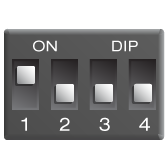
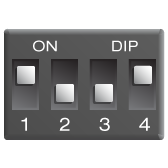
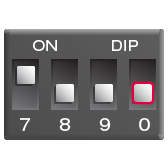
Changing the radio key
If your Bellman system is activated for no reason, there is probably a nearby system that triggers yours. To avoid radio interference, you need to change the radio key on all units. The radio key switches are located under the transmitter cover.
How does it work?
Overview
Overview
A simple connection between events and alerts.
A Bellman alerting system uses transmitters and receivers to keep you connected to important events throughout your home.
Transmitters detect activity where it happens. When an event is detected, they send a wireless signal to the receivers in your system.
Receivers turn that signal into an alert you can see, hear, or feel. Depending on the receiver, that may be a bright flashing light, a strong vibration, a loud sound, or a notification on a compatible smart device.
The core system communicates by radio and does not depend on your home's wifi. This keeps the connection direct and reliable, while battery-powered devices and backup batteries in compatible receivers help maintain coverage during a power outage.
Transmitters
Transmitters
Detection where it matters.
Transmitters are placed near the events you want to know about. Each detects a particular type of activity and sends a signal when it occurs.
Some listen for sounds, such as a baby crying or an existing doorbell. Others respond through a direct connection, the press of a button, or a built-in safety sensor.
Once activated, the transmitter signals your receivers, allowing the alert to reach you in another room or on another floor.
Most transmitters are wireless, with long battery life and minimal upkeep. Once placed and tested, they quietly keep watch in the background.
Receivers
Receivers
Alerts you can see, hear, or feel.
Receivers let you know when a transmitter detects something. Depending on the receiver, the alert may use bright flashes, strong vibrations, loud sounds, or smart notifications.
Place receivers in the rooms where you spend time, keep one beside your bed, or carry a portable receiver with you. Multiple receivers can respond together throughout your home.
Clear indicators help you identify what triggered the alert and respond appropriately.
Compatible mains-powered receivers include battery backup for continued alerts during a power outage.
Smartphone able, not required
Bring Bellman alerts to your smart devices.
The Bridge transceiver and Bellman Assistant app can extend your system to a compatible smartphone, tablet, or smartwatch. It is optional for those who want alerts on devices they already use.
When a transmitter is activated, the Bridge sends the alert to your connected devices through Bluetooth. One Bridge can connect with multiple compatible devices.
The connection also works in the other direction. When enabled, calls and messages on a connected device can activate your Bellman receivers.
A system that grows with you
Start with what you need.
Every Bellman alerting system begins with a transmitter and a receiver. From there, arrange it around your space, the events you want to detect, and how you prefer to be alerted.
Add transmitters or receivers as your needs change or you want coverage in more rooms. Bellman alerting products are designed to work together.
If you move, the system can move with you. Place the devices in your new home, reconnect any mains-powered products, and continue without pairing to a new wifi network.
Alerting system product portfolio
No products match this filter.