Baby Monitor Range: How to Choose One That Covers Your Whole Home

Most baby monitor range claims are measured in ideal open-field conditions - not through walls, floors, and the real-world layout of your home. Here is what the numbers actually mean, what cuts them down, and how to choose a system that delivers reliable coverage from nursery to every corner of your house.
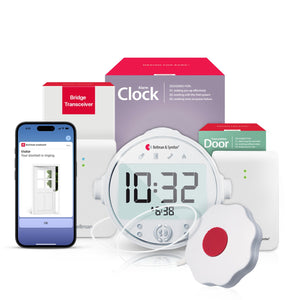
For whole-home baby monitoring, choose a system with a dedicated bridge transceiver rather than direct radio transmission. The Bellman Bluetooth Bridge relays signals from the baby monitor transmitter in the nursery to the Watch Receiver on your wrist - up to 650 feet in open field - covering large, multi-story homes reliably. Direct-transmission systems lose most of their stated range the moment a signal has to pass through walls, floors, and furniture.
Why Range Is the Most Misunderstood Baby Monitor Spec
When you are shopping for a baby monitor, the range claim on the box looks like a straightforward number. 1,000 feet. 1,500 feet. Some models claim even more. But those figures almost always reflect open-field performance - measured between two devices with nothing between them, often outdoors in a parking lot or field. The moment you bring the monitor inside your home, with its walls, floors, insulation, tile bathrooms, and appliances creating interference, the real-world range drops substantially. For some systems, it drops by 70 to 80 percent.
For most parents, this means a monitor that looked more than capable on paper delivers patchy, unreliable coverage in practice. For deaf and hard-of-hearing parents - who are relying on a wrist vibration or visual alert rather than simply turning up a speaker - patchy coverage is not a minor inconvenience. A missed alert is a missed alert. The system needs to work every time, from every corner of the home.
This guide explains exactly what affects baby monitor range in real homes, how to evaluate a monitor's coverage claims honestly, and why the architecture of the system matters far more than the headline range number on the box. It also covers how to plan transmitter placement and Bridge positioning to get maximum coverage from the Bellman Baby Monitor System in your specific home layout.
What Actually Cuts Baby Monitor Range in a Real Home
Understanding what degrades signal range in practice helps you evaluate products honestly - and plan your setup to avoid the biggest obstacles. The main factors are physical materials, signal frequency, and system architecture. All three interact.
Building Materials and Wall Construction
Not all walls are equal when it comes to radio frequency signals. A standard drywall interior partition loses very little signal. A concrete wall - common in basements, older homes, and some apartment buildings - can cut signal strength dramatically. Tile-covered walls, particularly bathroom and kitchen walls with metal mesh or foil backing in the plaster or insulation, act almost like a Faraday cage: the signal struggles to pass through at all. Even a single concrete floor between the nursery and your bedroom can reduce the effective range to a fraction of the open-field spec.
Radio Frequency and Wavelength
Different wireless systems operate on different frequency bands, and those frequencies behave differently in buildings. The 2.4 GHz band - used by most Wi-Fi routers and some baby monitors - is efficient for data throughput but is heavily affected by interference from other 2.4 GHz devices (routers, cordless phones, microwave ovens) and loses penetration through dense materials faster than lower frequencies. The 433 MHz band used by Bellman's alert transmitters has longer wavelengths, which means better wall penetration and more reliable signal in multi-story buildings with mixed construction materials.
Direct Transmission vs. Bridge Architecture
This is the most important architectural difference between standard baby monitors and purpose-built systems like the Bellman Baby Monitor System. Most conventional monitors use direct radio transmission: the transmitter in the nursery must reach the parent unit directly. Every wall, floor, and obstacle the signal encounters reduces its strength. When the parent unit is three rooms away on a different floor, the signal may not arrive reliably at all.
The Bellman system uses a two-hop architecture. The baby monitor transmitter in the nursery sends a 433 MHz signal to the Bluetooth Bridge. The Bridge, placed centrally in the home, then relays that signal to the Watch Receiver via Bluetooth - up to 650 feet in open field. Because each hop is independently optimised, and because the Bridge can be placed in the best central location for maximum coverage in both directions, the system performs far more reliably in multi-room, multi-story homes than any direct-transmission monitor.
The transmitter in the nursery must reach the parent unit directly - every wall, floor, and obstacle between them reduces signal strength. In a two-story home with concrete floors, effective range can fall below 100 feet. Range is fixed: you cannot optimise it without moving the parent unit permanently.
The baby transmitter reaches the Bridge (one hop, optimised by Bridge placement). The Bridge reaches the Watch Receiver (second hop, Bluetooth, up to 650 ft open field). Each hop can be independently optimised. The Watch travels with you - so wherever you go in the home, the alert follows.
How to Read Range Specs Without Being Misled
Range specs on baby monitor packaging are almost universally measured under best-case conditions. There is no industry standard that requires manufacturers to disclose real-world, in-home performance figures. This means comparing monitors on stated range alone is close to meaningless. Here is how to read the numbers more usefully.
Open-Field vs. In-Home Range: The Typical Difference
A monitor rated at 1,000 feet open-field will typically achieve somewhere between 150 and 300 feet inside a standard residential building, depending on wall materials and the number of barriers between devices. A monitor rated at 2,000 feet open-field does not necessarily outperform one rated at 1,000 feet indoors - the frequency, modulation type, and transmission power all matter more than the headline number.
What "Range" Should Actually Mean for a Deaf Parent
For a hearing parent, range means: can I hear the monitor from the other room? For a deaf parent using a vibrating wrist receiver, range means something stricter: does the alert reach my wrist reliably, every time, from every room in my home? The Watch Receiver only vibrates if the signal from the Bridge reaches it successfully. There is no audio fallback. This is why the architecture of the system - not just the stated range - is the critical factor to evaluate.
Range by Home Type: What to Expect in Your Specific Layout
Different homes present different coverage challenges. Here is a practical breakdown of what to expect and how the Bellman Bridge architecture handles each scenario.
Single-story ranch or bungalow
The easiest layout for any monitor system. With no floor crossings, even a direct-transmission monitor often achieves adequate range. With the Bellman Bridge placed centrally - a living room or hallway - the Watch Receiver gets reliable alerts from any room in a typical single-story home, including through two or three drywall walls. No special placement strategy required.
Two-story home (wood frame)
The most common American residential layout. The key challenge is the floor crossing between nursery and master bedroom. Direct-transmission monitors frequently lose reliability here. The Bellman Bridge placed on the same floor as the nursery, or centrally between floors, handles this well. The Watch Receiver travels with you - up or down stairs - so coverage follows your movement rather than depending on receiver placement.
Multi-story or large home
Homes over 2,500 square feet, or with three or more stories, benefit most from the Bridge architecture. A single Bridge placed on the middle floor handles transmitter signals from above and below, and covers the Watch Receiver wherever the parent moves throughout the home. For very large homes, strategic Bridge placement is the single most impactful setup decision. See the placement guide below.
Older construction or concrete/masonry
Concrete floors and walls are the hardest environment for any wireless baby monitor. The Bellman transmitter's 433 MHz frequency handles concrete better than 2.4 GHz systems, but Bridge placement becomes critical: the Bridge should be positioned on the same floor as the nursery when possible, minimising the number of concrete floors the transmitter signal must cross.
Apartment with open-plan layout
Open-plan apartments are generally well-covered by any system with adequate range, since signal travels easily across open space. The main challenge is that many apartments have concrete slab construction and dense neighbouring interference. The Bellman Bridge's offline Bluetooth architecture avoids Wi-Fi congestion issues common in dense apartment buildings. See our full guide on baby monitors without Wi-Fi for deaf parents.
Home with outdoor areas or garage
Parents who want to receive alerts while in the garden, on the porch, or in an attached garage need a system with enough range to cover those distances. The Bridge-to-Watch Receiver Bluetooth link's 650-foot open-field spec provides meaningful outdoor coverage from most homes. The smartphone app via Wi-Fi provides an additional layer when Bluetooth range is at its edge.
Why Bridge Architecture Solves the Range Problem
The fundamental limitation of any direct-transmission baby monitor is that its stated range assumes one signal path: transmitter to receiver, with nothing in between. Every obstacle that signal encounters - every wall, every floor, every appliance - reduces the available range budget. A monitor rated at 1,000 feet open-field that must pass through two concrete floors and four drywall walls may deliver reliable coverage of 150 to 200 feet in practice. If that distance barely reaches from the nursery to the master bedroom, you are already at the edge of reliable operation.
The Bellman Bluetooth Bridge solves this by splitting the coverage problem into two independent hops, each optimised separately:
- Hop 1 - Transmitter to Bridge (433 MHz RF): The baby monitor transmitter in the nursery sends a 433 MHz signal to the Bridge. You place the Bridge to minimise the barriers between it and the nursery - typically on the same floor. This first hop is entirely within the building, and 433 MHz's good wall-penetration characteristics mean it handles most residential construction reliably.
- Hop 2 - Bridge to Watch Receiver (Bluetooth, up to 650 ft): The Bridge relays the alert to the Watch Receiver on your wrist via Bluetooth. Because Bluetooth is a direct peer-to-peer link and the Watch travels with you, this hop is always as short as the distance from the Bridge to wherever you happen to be in the home. For most home layouts, this distance is well within reliable Bluetooth range.
- Parallel channel - Bridge to smartphone app: Simultaneously, the Bridge sends an alert to the Bellman app on your smartphone via Wi-Fi. This provides a second alert channel - useful as a backup and for caregivers in other parts of the home. Note that the app channel requires an internet connection, while the Watch Receiver channel does not.
The result is a system where range is not a fixed number, but a function of how intelligently the Bridge is placed. A well-positioned Bridge in a standard two-story American home will deliver reliable whole-home coverage - including the garden and garage - without any signal gaps.
For deaf and hard-of-hearing parents, "good enough range" is not a concept that applies. The alert either reaches your wrist every time or the system is not doing its job. Bridge architecture is what makes "every time" achievable.
Bellman & Symfon EditorialHow to Position the Bridge for Maximum Coverage
The single most impactful setup decision for whole-home coverage is where you place the Bluetooth Bridge. Unlike the baby monitor transmitter - which should always be close to the nursery - the Bridge should be positioned to serve both the transmitter's signal and the Watch Receiver's needs simultaneously. Here is how to think through placement for different home layouts.
The Central Placement Principle
In an ideal setup, the Bridge sits roughly equidistant from the nursery transmitter and the rooms where you spend the most time during the day. In a single-story home, this is usually a central hallway, living room, or home office. In a two-story home, the best position is often at the top of the stairs on the floor where the nursery is located - close enough to the transmitter for a strong first hop, and with line-of-sight access to the floor below for the second hop.
Placement Tips by Home Type
Physical Placement Details
Beyond the floor and room choice, a few physical placement details matter. The Bridge should be plugged into a wall outlet at shelf or table height - not on the floor behind furniture, which reduces both RF reception from transmitters and Bluetooth reach to the Watch. Keep the Bridge away from the top of large metal appliances (refrigerators, washing machines, filing cabinets), which can interfere with RF signals. And avoid placing it directly next to other Bluetooth devices like speakers or wireless keyboards, which can occasionally cause brief interference with the Bridge-to-Watch connection.
Once you have a placement in mind, do a coverage test before finalising it. Plug in the Bridge, pair the Watch Receiver, then walk through every room where you regularly spend time during the day - kitchen, living room, home office, bathroom, back yard - and trigger a test alert from the baby monitor transmitter. If the Watch vibrates reliably in every location, your Bridge placement is working. If any room shows inconsistent alerts, try moving the Bridge slightly - even a few feet can make a meaningful difference when you are right at the edge of a reliable range area.
The test takes five minutes and removes all guesswork about coverage. Do it when setting up, and again after any significant furniture rearrangement or renovations that change the layout of the home.
Bridge Architecture vs. Direct-Transmission Monitors: A Full Comparison
If you are evaluating the Bellman system against a conventional baby monitor for deaf parents, the range question is really a question of architecture. Here is a side-by-side comparison of what each approach delivers in practice.
| Feature | Direct-Transmission Monitor | Bellman Bridge System |
|---|---|---|
| Range architecture | Single hop: transmitter → parent unit, fixed placement | Two hops, independently optimised: transmitter → Bridge → Watch Receiver |
| Coverage while moving | Limited to rooms where the parent unit is placed | Watch Receiver travels with you - coverage follows your movement |
| Multi-story performance | Floor crossings significantly reduce stated range | Bridge placed to minimise floor crossings on transmitter hop; Watch hop is Bluetooth up to 650 ft |
| Real-world range in concrete construction | Often 15–25% of stated open-field range | 433 MHz handles dense materials better; Bridge placement optimises around problematic sections |
| Internet dependency | Varies - some require Wi-Fi or cloud for app alerts | Watch Receiver alerts via Bluetooth - no internet required; app alerts are an additional layer |
| Expandability | Baby monitor only - cannot add doorbell, smoke, or push button alerts | Same Bridge handles doorbell, smoke, push button, phone - all alerts on one Watch |
| Setup complexity | Varies - most are plug-and-play | Under 10 minutes - no tools, no electrician, no drilling |
Multi-Room Coverage: Twins, Large Families, and Separate Rooms
For families with twins, children in separate rooms, or multi-generational households where monitoring needs span more than one nursery, the Bellman system's expandability directly solves what would otherwise be a complex multi-device challenge. The same Bridge that handles one baby monitor transmitter can simultaneously receive signals from additional transmitters - each identified by its own distinct icon on the Watch Receiver.
A parent of twins with nurseries on the same floor simply adds a second baby monitor transmitter to the existing Bridge. Both transmitters communicate with the same Bridge, and the Watch Receiver shows an alert when either transmitter detects sound - allowing the parent to know immediately that a baby needs attention, wherever they are in the home. For a full guide on setting up monitoring for multiple rooms and children, see our detailed guide: baby monitor for twins and large families: multi-room alert setup guide.
When Coverage Needs Extend Beyond the Nursery
As children grow from newborns to toddlers, the rooms you need to monitor change. A child who naps in the living room playpen one month may nap in the upstairs bedroom the next. The Bellman Bridge system accommodates this naturally: you move the transmitter to wherever the child is sleeping, and the alert still arrives on your wrist through the same Bridge and Watch. No reconfiguration required - just place the transmitter and confirm it reaches the Bridge with a quick test.
Range at Night: When Coverage Matters Most
Nighttime is when baby monitor range matters most - and when most parents have the least redundancy if something fails. During the day, you might be moving through the home and able to check on the baby physically when in doubt. At night, you are asleep, your hearing devices are off, and you are entirely reliant on the alert system to wake you when the baby needs attention.
For deaf and hard of hearing parents, this means the nighttime setup needs to be bulletproof. The Watch Receiver worn on the wrist handles wrist-vibration alerts throughout the night - strong enough to wake most adults from normal sleep. For an alarm clock that also wakes you without sound at a set time, pairing the Bridge with the Bridge + Baby Monitor + Alarm Clock bundle gives you vibrating wake-up and baby alerts through the same system - no audible alarm needed.
The critical range question at night is: does the alert reach the Watch Receiver reliably from the Bridge, through the bedroom door, with the Watch on your wrist while you sleep? For most home layouts, the answer is yes - as long as the Bridge is not placed on a different floor behind multiple closed doors from the bedroom. If your bedroom is well-separated from the Bridge's central position, confirm coverage with a test alert before relying on it for overnight monitoring.
- Test Watch Receiver alert from sleeping position with bedroom door closed
- Place Bridge on same floor as nursery when possible - minimises floor-crossing loss
- Confirm transmitter is within 3–5 feet of where baby sleeps
- Wear Watch Receiver on wrist throughout the night - vibration wakes most adults reliably
- Charge Watch Receiver daily - keep battery above 20% before sleeping
- Add smoke/CO transmitter to same Bridge for complete overnight safety coverage
For a complete guide to sleeping with hearing loss as a parent - including tips for working night feeds into a reliable system - see our guide on sleep and parenting with hearing loss: practical tips and alert tools.
Setting Up for Whole-Home Coverage: A Practical Setup Sequence
Getting the most from the Bellman baby monitor system's range comes down to a few deliberate placement decisions during setup. The process takes less than ten minutes and does not require tools, technical knowledge, or a professional installer - but doing it thoughtfully produces noticeably better coverage than simply plugging in and hoping for the best.
- Step 1 - Draw a rough floor plan. You do not need to be precise. A quick sketch showing where the nursery is, where you typically spend daytime hours, and where the bedroom is gives you enough information to choose a Bridge location intentionally rather than by default.
- Step 2 - Choose a Bridge location on the transmitter's floor. In most two-story homes with an upstairs nursery, this means placing the Bridge upstairs - in the hallway, a nearby room, or as close to the middle of the upstairs floor as a power outlet allows. This minimises the distance the 433 MHz transmitter signal must travel on its first hop.
- Step 3 - Position the baby monitor transmitter in the nursery. Place it within 3 to 5 feet of where the baby sleeps - on a crib rail, shelf, or nearby surface. No drilling or wiring required.
- Step 4 - Pair the Watch Receiver to the Bridge. Follow the simple pairing steps in the Bellman app. Once paired, the Watch will vibrate and display the baby icon whenever the transmitter detects sound. The pairing is persistent - you only do this once.
- Step 5 - Run a whole-home coverage test. Walk through every room where you regularly spend time - kitchen, living room, bathroom, back yard, garage - and have someone trigger a test alert from the nursery transmitter, or use the transmitter's own test function. Confirm the Watch vibrates reliably in each location. If any area shows gaps, adjust the Bridge position slightly and retest.
- Step 6 - Test from your sleeping position. Do the final range test from your bed, with the bedroom door in its normal overnight position (open or closed). This is the most important confirmation - if the Watch alerts you reliably here, the system is ready for overnight monitoring.
Before You Rely on the System Overnight
Work through each item. Untested coverage is assumed coverage, and assumed coverage fails at the worst moments.
- Bridge placed centrally on nursery floor
- Transmitter within 3–5 ft of baby sleep spot
- Watch Receiver paired and confirmed with test alert
- Kitchen coverage confirmed - Watch vibrated
- Living room coverage confirmed - Watch vibrated
- Back yard / porch coverage confirmed
- Bedroom (sleeping position) coverage confirmed
- Watch Receiver charged - battery above 20%
- Smoke/CO transmitter added to same Bridge
- App installed and paired as secondary alert channel
Beyond Range: Why the System You Choose Shapes More Than Coverage
Range is a practical concern, but it is also a proxy for a more fundamental question: is this system designed for deaf and hard of hearing parents, or is it a hearing product with accessibility features bolted on? The answer shapes not just how far the signal travels, but how reliably it arrives, how easily the system expands as your family grows, and how well it integrates with every aspect of your home safety setup.
The Bellman system's Bridge architecture delivers reliable whole-home range, but it also means that the same Bridge covering your baby monitor can also handle your doorbell alerts, your smoke and CO alerts, your push button alerts, and your phone alerts - all delivered silently to the same Watch Receiver, each identified by a distinct icon, with no audible chimes that might startle a sleeping baby. This integration is the subject of our full guide: Baby monitor for deaf and hard of hearing is more than a baby monitor.
For deaf parents who are evaluating the complete picture - not just nursery monitoring but the whole-home safety and connectivity setup that a new baby demands - our pillar guide covers every component and decision in depth: Best baby monitors for deaf parents: vibrating and visual alert systems (2026).
Get whole-home coverage designed for deaf parents.
The Bellman Baby Monitor System with Bluetooth Bridge and Watch Receiver - reliable wrist alerts from nursery to every corner of your home. No Wi-Fi required. Setup in under 10 minutes.
Sources and references: Bellman & Symfon - Baby Monitor System with Bluetooth Bridge and Watch Receiver product specifications (us.bellman.com/products/baby-monitor-system-with-bluetooth-bridge-and-watch-receiver) · Bellman & Symfon - Bluetooth Bridge Transceiver BE1521 datasheet and user manual: Bluetooth range 650 ft open field, 433 MHz RF transmitter compatibility · Bellman & Symfon - Bluetooth Watch Receiver BE3330 specifications · FCC - 433 MHz ISM band frequency allocation and propagation characteristics · IEEE 802.15 - Bluetooth 5 specification: range and indoor propagation characteristics · Consumer Electronics Association - Wireless device range specification practices (open-field testing standards) · National Institute on Deafness and Other Communication Disorders (NIDCD) - Hearing loss statistics · Gallaudet University Research Institute - Deaf parenting and household safety data.
This article is for informational purposes only. Product range specifications reflect open-field conditions; real-world performance varies by building construction. Refer to current product pages at us.bellman.com for the most up-to-date specifications.

Baby Monitor Range: How to Choose One That Covers Your Whole Home
This guide breaks down the practical choices, features, and considerations behind this topic. Use it to identify a setup that fits the listener, the environment, and the everyday moments that matter most.
The featured products below are current Bellman options discussed in the article or closely matched to its use case.