Best Baby Monitors for Deaf Parents: Vibrating & Visual Alert Systems (2026)

A complete guide to choosing a baby monitor that works for deaf and hard-of-hearing parents - how vibrating wrist alerts, visual icons, and whole-home connectivity keep you aware and your baby safe, day and night.
- Why standard baby monitors don't work for deaf parents
- How vibrating and visual baby monitor systems work
- The Bellman system: Bridge, Baby Monitor, and Watch Receiver
- More than a baby monitor: staying alert to everything at home
- Day and night awareness: how the system adapts to your routine
- Why offline baby monitors are safer for deaf parents
- Getting started: what the setup actually looks like
- Covering your whole home: range, multi-room, and multi-sensor setups
- How to choose the right configuration for your family
- Frequently asked questions
Becoming a parent is one of the most demanding roles a person can take on. The first weeks and months ask something extraordinary of you: sustained awareness, interrupted sleep, the constant need to respond to a person who cannot yet tell you what they need. For deaf and hard-of-hearing parents, that challenge comes with an additional layer - the audio cues that most parenting tools depend on are simply not accessible.
Standard baby monitors, whether basic audio units or modern Wi-Fi cameras with two-way talk, are designed for hearing parents. Their core notification method - a sound alert - is inaccessible to parents with significant hearing loss, and wearing hearing devices around the clock is neither comfortable nor practical. The result is that many deaf parents default to strategies that are exhausting rather than reliable: checking on the baby constantly, relying entirely on a hearing partner, or losing sleep worrying about missing an alert.
The good news is that baby monitoring technology has caught up. Purpose-built systems designed specifically for deaf and hard-of-hearing parents use vibration and visual alerts to replace sound entirely - delivering strong wrist vibrations, bright LED flashes, and clear icon-based alerts the moment your baby needs you. This guide covers how those systems work, what to look for, and how to build a setup that keeps your baby - and your whole household - safe around the clock.
Why Standard Baby Monitors Don't Work for Deaf Parents
The vast majority of baby monitors on the market - from basic audio units to premium smart cameras - were designed with hearing parents as the default user. Even monitors marketed as "smart" or "advanced" rely on sound as their primary alert mechanism: a speaker plays back nursery audio, a chime sounds when the baby moves, or a mobile app sends a push notification accompanied by a notification tone.
For a parent with significant hearing loss, these design choices create a cascade of practical problems:
- Speaker-based audio monitoring is inaccessible without hearing devices, and most parents remove their devices at night - precisely when monitoring matters most.
- App notification sounds rely on the phone being audible. If the phone is on silent or across the room, the alert is missed entirely.
- Wi-Fi-dependent smart monitors add further failure points: network drops, server outages, and app glitches can all interrupt the alert chain at critical moments.
- LED indicator lights on parent units are typically small, require line-of-sight, and offer no tactile component - making them ineffective when a parent is asleep, facing away, or in another room.
- Two-way audio features are designed to let parents speak to the baby remotely - a function that is unnecessary and sometimes counterproductive when the goal is silent, non-disruptive alerting.
The result is that hearing parents and deaf parents have fundamentally different needs when it comes to baby monitoring. Hearing parents need clear audio reproduction. Deaf and hard-of-hearing parents need strong tactile alerts, visible visual signals, and systems that work independently of both sound and internet connectivity.
One of the most commonly overlooked aspects of deaf parenting is what happens at night. A hearing parent can place a monitor on the bedside table and be woken by audio. A deaf parent wearing no hearing devices needs a system that creates a physical sensation strong enough to rouse them from sleep - either through a vibrating wrist receiver worn during the night, a bed shaker placed under the mattress, or both. This is a non-negotiable requirement, and it is one that most mainstream monitors simply do not address.
How Vibrating and Visual Baby Monitor Systems Work
Purpose-built baby monitors for deaf parents operate on a fundamentally different principle than conventional monitors. Instead of transmitting audio to a speaker, they detect sound or movement in the nursery and convert that detection into a tactile or visual signal that reaches the parent wherever they are in the home.
Here is how that signal chain works in a well-designed system:
-
Detection at the source A transmitter placed in or near the crib detects the baby's sounds - crying, fussing, or movement - using a sensitive microphone or motion sensor. This detection happens locally and does not depend on any internet connection.
-
Signal transmission to the Bridge. The transmitter sends a wireless signal to the Bluetooth Bridge, a central hub that receives signals from all connected transmitters in the home. The Bridge can be placed in a central location to maximise whole-home coverage.
-
Alert delivery to the Watch Receiver. The Bellman Watch Receiver, worn on the wrist, receives the alert from the Bridge and responds with a strong vibration pattern and a clear visual icon that identifies which sensor triggered - in this case, a baby icon - so you know exactly what needs attention without needing to hear a thing.
-
Simultaneous app alert (optional) The Bluetooth Bridge can also send alerts to the Bellman smartphone app, meaning a second parent or caregiver with the app installed also receives a notification - useful when both parents want to be aware, or when a grandparent or support person is helping.
The key design principle here is that the Watch Receiver is the primary alert channel. It is on your wrist, it vibrates directly against your skin, and it wakes you from sleep reliably. The smartphone app serves as a secondary layer of awareness - helpful, but not relied upon as the sole alert mechanism.
The difference between a standard monitor and a vibrating alert system isn't just a feature upgrade - it's the difference between a product designed for hearing parents and one designed for you.
Bellman & Symfon EditorialThe Bellman System: Bridge, Baby Monitor, and Watch Receiver
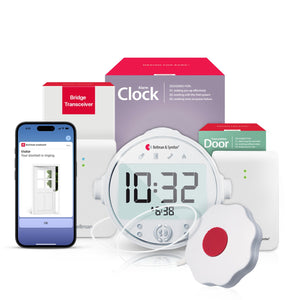
The Bellman Baby Monitor System with Bluetooth Bridge and Watch Receiver is designed from the ground up for deaf and hard-of-hearing parents. Rather than adapting an audio-first product with accessibility add-ons, the system is built around tactile and visual alerting as core functions - not afterthoughts.
The Baby Monitor Transmitter
The baby monitor transmitter is placed in the nursery, within range of where your baby sleeps. It uses a sensitive condenser microphone to detect crying and fussing at appropriate sensitivity levels, and transmits a signal wirelessly as soon as sound is detected above the set threshold. The transmitter communicates with the Bluetooth Bridge rather than directly with the Watch Receiver, which is what enables whole-home coverage and the ability to connect multiple sensors simultaneously.
The Bluetooth Bridge
The Bellman Bluetooth Bridge is the central hub of the entire system. It receives signals from every connected transmitter - the baby monitor, doorbell, smoke alarm, push button, phone ringer, and more - and distributes those alerts to all paired receivers. This architecture is what makes the system expandable: you are not buying a standalone baby monitor. You are building a home alerting platform that grows with your family's needs.
The Bridge connects to your home Wi-Fi to enable smartphone app alerts, but the core wrist-alert pathway - Bridge to Watch Receiver - operates over Bluetooth and does not depend on internet connectivity. If your Wi-Fi goes down, your Watch Receiver still alerts you. This is a critical safety distinction from cloud-dependent smart monitors.
The Watch Receiver
The Bellman Watch Receiver is worn on the wrist and delivers two types of alert simultaneously: a strong vibration pattern and a visual icon on the watch face that identifies which sensor triggered. The baby icon tells you it's the nursery. The doorbell icon tells you someone is at the door. A flame icon signals a smoke alarm. This icon-based identification means you always know what requires your attention without needing to pull out your phone or walk to a display panel.
The Watch Receiver is designed to be worn during sleep. The vibration is strong enough to wake most users from deep sleep - a capability that is fundamental to its function as a nighttime alert device for parents who sleep without hearing devices.
More Than a Baby Monitor: Staying Alert to Everything at Home
Here is something that often surprises new parents in the deaf and hard-of-hearing community: the moment you set up a vibrating baby monitor system, you have also built the foundation for whole-home safety alerting. And once you are a parent - especially a new parent - that matters more than ever.
Think about what changes when a baby enters the home. You are sleeping more deeply when you do sleep, because your body is recovering from exhaustion. The baby is in another room. You may be moving between floors, in the garden, or in any corner of a busy household. The sounds you relied on before - a doorbell, a smoke alarm, the phone ringing - are now harder to catch because your attention is divided and your household is louder.
For deaf and hard-of-hearing parents, these challenges are compounded. The Bellman Bluetooth Bridge addresses them all in one system.
Baby Monitor
The baby transmitter in the nursery alerts your Watch Receiver with a baby icon the instant your child cries or stirs - whether you are asleep, in the kitchen, or anywhere else in your home.
Doorbell Alerts - Without Waking the Baby
A doorbell transmitter connected to your Bridge means you get a doorbell icon on your wrist when someone rings - silently. No chime sounds through the house. No startled baby. You simply feel the alert and go to the door. See our guide on doorbell alert systems for deaf parents.
Smoke and CO Alerts - Day and Night
A smoke and CO transmitter connected to your Bridge ensures that fire and carbon monoxide emergencies trigger an immediate wrist vibration and a distinct alert icon - even when you are asleep and your hearing devices are off. This is not optional safety - it is essential.
Push Button - Silent Household Communication
A push button transmitter lets another person in your home - a co-parent, a family member, a caregiver - alert you silently without calling out. The push button icon appears on your Watch Receiver. No audio needed. No baby woken up. This is especially useful between nap times when everyone is trying to communicate quietly. Learn more about push button alert setups.
Phone Call Alerts
When your phone rings, the Bridge detects it and sends a phone icon alert to your Watch Receiver. You will never miss an important call - from a doctor, family member, or emergency contact - because you were focused on feeding or settling your baby and didn't hear your phone.
Alarm Clock Alerts - Wake Up Without Sound
Paired with a Bridge + Alarm Clock bundle, you can wake to a wrist vibration rather than an audible alarm - meaning your partner and baby are not disturbed by a loud clock while you still wake reliably at your set time.
One of the often-overlooked benefits of a vibrating alert system for deaf parents is what it does for the baby's environment. When all your household alerts - doorbell, push button, phone, alarm clock - are routed through a wrist receiver instead of audible chimes and ringtones, the home becomes measurably quieter. That means fewer sudden sounds that startle a sleeping baby, and a calmer household overall. Getting alerts on your wrist is not just about your needs - it is genuinely better for your baby too.
Day and Night Awareness: How the System Adapts to Your Routine
Parenting doesn't follow a schedule, and neither should your alerting system. The Bellman system is designed to provide reliable awareness throughout a full 24-hour cycle - adapting to the very different demands of daytime and nighttime parenting.
Daytime Alerting
During the day, you are likely moving around the house - cooking, doing laundry, working from home, and managing older children. The Watch Receiver on your wrist travels with you, meaning every alert from every connected sensor reaches you wherever you are in your home. The smartphone app provides an additional layer: if you are out in the garden or in a part of the house where Bluetooth range is at the edge, the app notification through your home Wi-Fi picks up the slack.
Daytime is also when the push-button and doorbell transmitters prove their value most clearly. Visitors arrive. Co-parents or caregivers need to communicate without shouting across rooms. Delivery drivers ring the bell. All of these become wrist alerts - silent, immediate, and distinguishable by icon.
Nighttime Alerting
Nighttime is where the system's design truly separates it from mainstream alternatives. When you remove your hearing devices and go to sleep, you are relying on the Watch Receiver's vibration alone to wake you. The vibration is intentionally strong - this is not a gentle nudge but a purposeful alert designed to rouse a sleeping adult. You wear it to bed, and when the baby cries, you feel it.
For nighttime sleep, pairing the Bridge with an alarm clock transmitter is particularly effective. The Bridge + Baby Monitor + Alarm Clock bundle covers both morning wake-up and overnight baby monitoring through the same wrist receiver - no audio required at any point in the night.
- Wear the Watch Receiver to bed - it vibrates directly against the skin
- Place baby monitor transmitter within 3–5 feet of where the baby sleeps
- Use a Bridge + Alarm Clock bundle to cover both morning alarms and overnight alerts
- Connect a smoke/CO transmitter on the same Bridge for overnight safety
- Charge the Watch Receiver daily so it is always ready for overnight wear
- Test all connected transmitters before relying on the system overnight
Why Offline Baby Monitors Are Safer for Deaf Parents
Smart baby monitors - cameras with live streaming, two-way audio, and app-based alerts - are marketed heavily as the premium category. They offer features that are genuinely useful for hearing parents: clear video, temperature monitoring, and sleep analytics. But for deaf and hard-of-hearing parents, these systems carry a hidden vulnerability that makes them a poor primary choice.
Cloud-dependent monitors route their alert notifications through the internet. The chain looks like this: nursery camera → home Wi-Fi → the manufacturer's cloud servers → your smartphone app. Every link in that chain is a potential failure point. If your Wi-Fi drops, your router reboots, the manufacturer's servers experience an outage, or your phone's operating system delays a background notification - your alert is delayed or never arrives.
For a hearing parent, these failures are inconveniences - they can still hear the baby. For a deaf parent who is relying on the app notification as their only alert channel, a cloud failure during the night is a genuine safety gap.
The Bellman system addresses this directly. The core alert pathway - baby monitor transmitter → Bluetooth Bridge → Watch Receiver - operates over local Bluetooth and does not route through the internet. If your Wi-Fi goes down at 3 a.m., your Watch Receiver still vibrates when your baby cries. The app alert is a valuable secondary layer, but the system does not depend on it.
A baby monitor for a deaf parent is a safety device first. It needs to work when the internet doesn't, when the power flickers, and when everything else fails. That reliability has to be built in - not bolted on.
Bellman & Symfon EditorialTo learn more about the benefits of internet-independent alerting for deaf parents, see our full guide: Baby monitor without Wi-Fi for deaf parents: why offline is safer.
Getting Started: What Setup Actually Looks Like
One of the most common concerns new users have about purpose-built alerting systems is that they will be complicated to install or configure. The Bellman system is designed to be set up without tools, technical knowledge, or a professional installer. Most users are fully operational in under ten minutes.
-
Plug in the Bluetooth Bridge. Place the Bridge in a central location in your home - an upstairs hallway, a living room, or anywhere that gives it good proximity to both your sensors and your typical movement areas. Plug it in and connect it to your home Wi-Fi using the Bellman app.
-
Pair the Watch Receiver. Put on the Watch Receiver and follow the simple pairing steps in the app. Once paired, the Watch Receiver will receive all alerts transmitted through the Bridge.
-
Position the baby monitor transmitter. Place the baby monitor transmitter in the nursery, close to where the baby sleeps. Clip it to the crib rail or place it on a nearby surface. No wiring required.
-
Test the connection. Make a sound near the transmitter. Within a couple of seconds, your Watch Receiver should vibrate and display the baby icon. This confirms the full signal chain is working.
-
Add additional transmitters as needed If you are also connecting a doorbell, smoke alarm, or push button transmitter, add them to the same Bridge. Each new sensor pairs to the Bridge independently and sends its own icon alert to the Watch Receiver.
The entire Bellman system is designed for self-installation by non-technical users. There is no drilling, no wiring, no hub programming, and no professional setup fee. If you can charge a phone and connect to Wi-Fi, you can set up this system. The typical setup time - including pairing all sensors - is under ten minutes.
Covering Your Whole Home: Range, Multi-Room, and Multi-Sensor Setups
Baby monitoring is not a problem that stays in one room. As your child grows from a newborn sleeping in a nursery to a toddler napping in a different part of the house, the demands on your alerting system shift. The Bellman Bluetooth Bridge architecture is designed to scale with you.
Range and Coverage
The Bluetooth Bridge has an open-field range of up to 650 feet - enough to cover most large homes, multi-storey houses, and even homes with adjacent garden areas. In real-world conditions, range is affected by walls, floors, and materials, but the Bridge-based architecture performs substantially better than direct radio transmission systems (where the transmitter must reach the parent unit directly) because the Bridge acts as a dedicated relay point.
For particularly large homes or properties with challenging layouts, placing the Bridge in a central location - rather than adjacent to either the nursery or the bedroom - maximises coverage symmetrically. If you are unsure about coverage in your specific home, our detailed guide on baby monitor range for whole-home coverage walks through the key considerations.
Multiple Rooms and Multiple Children
The Bellman Bridge supports multiple transmitters simultaneously. For families with twins, children in separate rooms, or multi-generational households, this means distinct alerts from each monitored space - with different icon labels to identify the source. A parent of twins can receive a baby alert from Room 1 and a separate alert from Room 2, each displayed on the same Watch Receiver with the appropriate identifier.
For full guidance on multi-room monitoring setups, see: Baby monitor for twins and large families: multi-room alert setup guide.
Multi-Sensor Safety Coverage
Beyond baby monitoring, the same Bridge supports smoke alarms, CO detectors, doorbell transmitters, push buttons, and phone ringers. For a newly expanded family, connecting all of these to a single Bridge is both practical and important. The Watch Receiver's icon system keeps each alert clearly identified, so you are never left guessing which sensor triggered your vibration. To explore the full scope of home safety that the Bellman system enables for deaf parents, see our guide: Baby monitor for deaf and hard of hearing is more than a baby monitor.
How to Choose the Right Configuration for Your Family
The Bellman system is modular by design, which means the right starting point varies based on your situation. Here is a practical framework for matching your family's needs to the right setup.
Starting Simple: Baby Monitor Only
If you are primarily focused on nursery monitoring and want to start with the essentials, the Bellman Baby Monitor System with Bluetooth Bridge and Watch Receiver gives you everything you need: the Bridge, the baby transmitter, and the Watch Receiver. You can add additional transmitters later as your needs grow.
For Overnight Coverage: Add an Alarm Clock
If you also want a silent wake-up solution - so you can get up without an audible alarm disturbing your partner or baby - pair the baby monitor system with the Bridge + Baby Monitor + Alarm Clock bundle. This bundle pairs a vibrating alarm clock with the Bridge so your morning alarm, like your baby alerts, arrives silently on your wrist.
For Full Home Safety: Add Smoke and CO
For complete household safety coverage, add a smoke and CO transmitter to your Bridge. The Bridge + Smoke/CO + Alarm Clock bundle is a strong foundation for any deaf or hard-of-hearing parent who wants both overnight baby monitoring and whole-home emergency alerting through a single system.
For Silent Household Communication: Add a Push Button
If you live with a partner, family member, or co-parent who wants to alert you silently - without calling out or making noise that might wake the baby - add a push button transmitter. The Bridge + Push Button + Alarm Clock bundle combines household communication with overnight alerting in a single package.
Everything you need for complete day-and-night coverage
Use this checklist to build the right Bellman configuration for your family.
- Bellman Baby Monitor Transmitter - in the nursery
- Bluetooth Bridge - centrally located in your home
- Watch Receiver - worn throughout the day and during sleep
- Smoke / CO Transmitter - for overnight emergency alerting
- Doorbell Transmitter - silent doorbell alerts to your wrist
- Push Button Transmitter - silent household communication
- Alarm Clock - wake up without sound disturbing baby or partner
- Smartphone App - secondary alert layer and system management
- Test all sensors before first overnight use
- Charge Watch Receiver daily for uninterrupted overnight coverage
Frequently Asked Questions
-
Can one Watch Receiver receive alerts from multiple transmitters? Yes. The Watch Receiver paired to the Bluetooth Bridge receives alerts from every transmitter connected to that Bridge - baby monitor, doorbell, smoke alarm, push button, and more - each identified by its own distinct icon on the watch face.
-
Is the vibration strong enough to wake a sleeping adult? The Bellman Watch Receiver's vibration is designed specifically for users who are asleep and not wearing hearing devices. It is intentionally stronger than a typical smartwatch notification. Most users find it reliably wakes them from normal sleep.
-
What happens if my internet goes down? The core alert pathway - transmitter to Bridge to Watch Receiver - operates over local Bluetooth and does not require an internet connection. Wrist alerts continue to function normally during internet outages. Only the smartphone app alerts are affected by connectivity loss.
-
Will the doorbell or push button alert wake my baby? No. All alerts in the Bellman system are delivered silently to your Watch Receiver. There are no audible chimes or ringtones from the Bridge or transmitters. Your home remains quiet while you receive immediate wrist alerts.
-
How many sensors can I connect to one Bridge? The Bellman Bluetooth Bridge supports multiple transmitters simultaneously. For a detailed guide on multi-sensor and multi-room setups, see our multi-room setup guide.
-
Do I need a professional to install the system? No. The entire Bellman system is designed for self-installation in under ten minutes, with no tools or technical knowledge required. Every component plugs in or clips on, and the Bellman app guides you through pairing.
-
Can both parents receive alerts? Yes. Multiple people can install the Bellman app and receive smartphone notifications from the same Bridge. Both parents - whether in the same home or in different locations - can stay aware. The Watch Receiver is the primary alert channel for the parent most directly responsible for the baby overnight.
-
Does the system alert me to smoke and CO as well as baby sounds? Yes, when a smoke or CO transmitter is connected to the same Bridge. See our guide on baby monitoring and home safety for deaf parents for full details on building a combined alerting setup.
More in This Series
How vibrating baby monitors work: a guide for deaf and hard of hearing parents
A detailed technical breakdown of how vibrating alert systems detect, transmit, and deliver baby alerts to your wrist.
Deaf parenting: how to stay safe and connected at home with the right tech
From baby monitoring to smoke alarms, a complete look at how deaf parents can build a fully accessible home safety setup.
Sleep and parenting with hearing loss: practical tips and alert tools that help
How to sleep with confidence as a deaf or hard-of-hearing parent - strategies and tools for reliable overnight alerting.
Baby monitor without Wi-Fi for deaf parents: why offline is safer
Why internet-independent alerting is a critical safety requirement for deaf parents, and how the Bellman system delivers it.
Build your complete home alert system - designed for deaf parents.
Explore the Bellman Baby Monitor system and the full range of Bluetooth Bridge accessories - baby alerts, doorbell, smoke, push button, and alarm clock, all on your wrist.

Sources: National Institute on Deafness and Other Communication Disorders (NIDCD) - Quick Statistics About Hearing; Age-Related Hearing Loss · World Health Organization (WHO) - Deafness and Hearing Loss Fact Sheet (2026) · Centers for Disease Control and Prevention (CDC) - Hearing Loss in Children; Noise-Induced Hearing Loss · National Association of the Deaf (NAD) - Parenting Resources · Gallaudet University Research Institute - Deaf Parenting Survey Data · Hearing Loss Association of America (HLAA) - Assistive Technology Resources · National Institute on Aging (NIA) - Hearing Loss: A Common Problem for Older Adults · Consumer Product Safety Commission (CPSC) - Infant Sleep Safety Guidelines · American Academy of Pediatrics (AAP) - Safe Sleep Recommendations
This article is for informational purposes only and does not constitute medical or safety advice. For personalised hearing health guidance, consult a licensed audiologist or healthcare provider.
Best Baby Monitors for Deaf Parents: Vibrating & Visual Alert Systems (2026)
This guide breaks down the practical choices, features, and considerations behind this topic. Use it to identify a setup that fits the listener, the environment, and the everyday moments that matter most.
The featured products below are current Bellman options discussed in the article or closely matched to its use case.