Deaf Doorbell vs Smart Doorbell (Ring, Nest): Which Actually Works for Hearing Loss?

Ring and Nest are everywhere. They're well-marketed, easy to buy, and genuinely useful for people with normal hearing. But for someone who is deaf or hard of hearing, they have a fundamental design problem: they notify your phone, not your body. This guide explains exactly where smart video doorbells fall short for hearing loss - and what actually works instead.
Unlike Ring or Nest doorbells that require Wi-Fi and a phone screen check, a deaf doorbell system delivers an instant wrist vibration and icon alert even when your phone is silenced, on a charger, or the internet is down. The core alert goes directly to a receiver worn on your wrist - no phone, no app, no internet connection required for the notification to reach you.
- How Ring and Nest doorbells actually work
- Why smart video doorbells fail people with hearing loss
- How a deaf doorbell system works instead
- Full side-by-side comparison: Ring/Nest vs Bellman
- Real-world failure scenarios for smart doorbells
- What smart doorbells actually do well
- Can you use both? Using Ring/Nest alongside a deaf doorbell system
- Overnight alerting: where the gap is widest
- How to choose the right system for your situation
- Frequently asked questions
How Ring and Nest Doorbells Actually Work
Ring, Google Nest, and Arlo video doorbells all follow the same fundamental architecture. When someone presses the doorbell button at your door, the device sends a signal over your home Wi-Fi to a cloud server. The cloud server then sends a push notification to any paired smartphone that has the corresponding app installed. If you have a Ring Chime device plugged into an outlet, it also plays an audible chime through that speaker. The video feed is recorded and stored in the cloud for later review.
That's the complete chain: button → Wi-Fi → cloud → phone notification → you look at your phone screen. Every link in that chain works well when conditions are ideal. The problems for deaf and hard-of-hearing people emerge when any link is stressed, which happens far more often than the marketing suggests.
Why Smart Video Doorbells Fail People with Hearing Loss
The failure isn't a bug in Ring or Nest - it's a design assumption built into the entire category. Smart video doorbells are designed for people who will hear the chime or glance at their phone when a notification appears on screen. Both of those assumptions break down for deaf and hard-of-hearing users in ways that matter daily.
Phone on Silent
The single most common real-world scenario. Most people keep their phone on silent or vibrate during work calls, meetings, TV, exercise, and at night. A push notification to a silenced phone produces no alert a deaf or hard-of-hearing person will detect. The visitor stands at the door; the phone lights up silently in another room. No one answers.
Phone Charging in Another Room
Phones are frequently left charging in the bedroom, kitchen, or office while the person is elsewhere in the home. A notification on a phone screen two rooms away delivers no alert to someone who is profoundly deaf - or who simply isn't looking at the screen. The alert existed; it just didn't reach the person.
Internet Outage or Wi-Fi Disruption
Smart doorbell systems depend on an active internet connection for every notification. Wi-Fi disruptions, router reboots, ISP outages, and power fluctuations all break the alert chain - and they tend to happen at inconvenient times. During a power outage, when security awareness matters most, cloud-dependent doorbell alerts stop working entirely.
Notification Delay
The button → Wi-Fi → cloud → phone route introduces latency. In good conditions, smart doorbell notifications typically arrive 4 to 12 seconds after the button press. In poor Wi-Fi conditions, delays of 20 to 30 seconds are not unusual. A visitor who pressed the bell and waited ten seconds has often already decided no one is home. For a deaf user who finally receives the notification, the window to respond has closed.
No Body-Worn Alert
The most fundamental limitation: Ring and Nest have no wrist vibration option. There is no receiver you can wear on your body that fires the moment someone presses your bell. The entire alert architecture is screen-based - you must look at a screen (phone, tablet, Echo Show) to know someone is at the door. A wrist vibration that reaches you in the kitchen, garden, or bathroom regardless of screen proximity is simply not available.
Ring Chime Is Audible Only
Ring sells a plug-in chime device that produces a louder audible alert from an outlet in your home. This is useful for people with mild hearing loss - it's essentially an amplified chime. But it is still entirely audible: a speaker sound that fails the moment you're out of earshot, and provides no tactile alert at all for someone who is profoundly deaf. It does not close the fundamental gap.
Ring notifies your phone. A deaf doorbell system notifies your wrist. That distinction determines whether the alert actually reaches you - or quietly disappears into a pocket.
Hearing Loss Association of America (HLAA) - Assistive Technology ResourceHow a Deaf Doorbell System Works Instead
A purpose-built deaf doorbell system solves the notification problem at the architecture level - not by making the phone notification louder or more persistent, but by removing the phone from the primary alert chain entirely.
Button pressed → signal travels over Wi-Fi → to cloud server → cloud sends push notification → to your smartphone → you notice the screen lighting up or feel a brief phone vibration → you open the app → you see who is at the door.
Every step after the button press depends on: an active internet connection, a nearby phone, the app running in the background, notifications not being silenced, and you actively checking your phone.
Button pressed (or chime sounds) → door transmitter fires a Bluetooth signal → Bluetooth Bridge relays it → Watch Receiver on your wrist vibrates and shows a doorbell icon within 1–2 seconds.
No internet required. No phone required. No app running. No screen to check. The alert is on your body the moment the button is pressed.
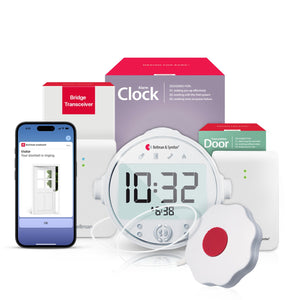
The Bellman Doorbell System with Bluetooth Bridge and Watch Receiver is designed from the ground up for this use case. The door transmitter sits near your existing indoor chime - no replacement of your current doorbell button required - and the entire setup takes under ten minutes with no tools and no technical knowledge. The smartphone app (Bellman Connect) can be added as an optional secondary notification layer, but the wrist alert functions entirely without it.
Full Side-by-Side Comparison: Ring/Nest vs Bellman
| Factor | Ring / Google Nest Video Doorbell | Bellman Deaf Doorbell System |
|---|---|---|
| Primary alert method | Smartphone push notification - requires phone nearby and not silenced | Wrist vibration + icon on Watch Receiver - always on your body |
| Works when phone is silenced | No - push notification produces no physical alert | Yes - Watch Receiver vibrates independently of phone status |
| Works when phone is in another room | No - alert stays on the phone screen where you left it | Yes - Watch Receiver goes wherever you go |
| Works without internet / Wi-Fi | No - entire system depends on cloud connectivity | Yes - core wrist alert is Bluetooth-only, no internet needed |
| Alert delay after button press | 4–12 seconds typical; 20–30s+ in poor Wi-Fi conditions | 1–2 seconds - direct Bluetooth, no cloud routing |
| Body-worn wrist alert available | No - no wearable receiver option exists | Yes - Watch Receiver is the core of the system |
| Works for profoundly deaf users | No - designed for users who will hear or see a phone alert | Yes - tactile alert requires no hearing at all |
| Works without replacing existing doorbell | Usually requires wiring or specific installation | Yes - door transmitter sits near your existing chime, no replacement needed |
| Installation complexity | Moderate - requires wiring for most models; app setup required | Very low - plug in Bridge, place transmitter, pair Watch Receiver. Under 10 minutes. |
| Expandable to smoke, baby, push button alerts | No - doorbell only; separate systems for other alert types | Yes - same Bridge and Watch Receiver handle all alert types |
| Works during power outage | No router and cloud connection both fail | Bridge needs outlet power; Watch Receiver battery-powered and continues receiving |
| Privacy - video recording of visitors | Records all visitors; footage stored in cloud; privacy concerns | No camera; no recording; no visitor data stored anywhere |
| Monthly subscription required | Yes - cloud video storage requires paid plan (Ring Protect, Nest Aware) | No subscription - one-time purchase, no ongoing fees |
Real-World Failure Scenarios for Smart Doorbells
The limitations above aren't theoretical. These are the situations that deaf and hard-of-hearing users encounter on a normal day at home - and where Ring and Nest consistently fail to deliver the alert.
- Showering. Phone left in the bedroom. Ring notification fires and stays on the locked screen. Visitor waits, then leaves. You exit the shower to find a missed delivery card on the doorstep.
- Working with headphones or hearing aids out. Phone is on the desk on silent during a focus session. The Ring app notification badge appears. You don't see it until you pick up the phone twenty minutes later. The courier has already left.
- Napping or sleeping. Phone is charging across the room. The notification produces no vibration you'll feel from across the room during sleep. A family member, care worker, or emergency responder stands at the door with no response.
- Gardening or working outside. Phone is inside. Ring requires the phone to be on your person or within earshot of a Chime device. Neither condition is met. The doorbell fires; you don't know.
- Internet outage. The router reboots or ISP drops during a storm. Ring stops sending all notifications. Anyone pressing the doorbell during the outage gets no response - and you have no way of knowing you missed them.
- Low phone battery / phone off. Ring sends a push notification to a phone that has automatically powered off due to low battery. The notification queues and arrives hours later when you charge again. The visitor is long gone.
- Phone on silent or Do Not Disturb - notification produces no detectable alert
- Phone in another room - visual notification not seen; vibration not felt
- Internet outage - entire notification chain stops working
- Low phone battery or phone off - notification never delivered
- Notification buried under other app alerts - missed without actively checking
- Sleeping without phone nearby - no alert reaches the sleeping person
What Smart Doorbells Actually Do Well
A fair comparison requires acknowledging what Ring and Nest are genuinely good at - for the right use case. These are not bad products. They are products designed for a specific user profile that does not include people who are deaf or hard of hearing.
Video Verification
Ring and Nest let you see who is at the door before opening it - a genuine convenience and security feature. You can see a delivery driver, a neighbor, or an unexpected visitor without going to the door at all. For this use case, video doorbells are excellent. This feature is simply absent in a dedicated deaf doorbell system, which alerts you but does not show you the door.
Two-Way Audio
Smart video doorbells allow you to speak to the person at your door through the app - useful for telling a delivery driver where to leave a package without opening the door. For hearing people, this is a valuable feature. For profoundly deaf users, it is less relevant as a safety tool, but can still be useful for communication when combined with visual alerts from a separate system.
Motion-Triggered Recording
Video doorbells record footage when motion is detected near the door - useful for reviewing delivery arrivals, monitoring package theft, and providing evidence in the event of an incident. This passive security recording function works regardless of whether notifications reach the user, making it a useful supplement to - though not replacement for - an accessible alert system.
Remote Monitoring by Family
Ring and Nest can send notifications to multiple phones - meaning a family member or caregiver can receive the doorbell notification on their own phone and act on behalf of the deaf or hard-of-hearing household member. This is a useful workaround when a caregiver is present, but is not a reliable primary solution for independent living.
Can You Use Both? Using Ring/Nest Alongside a Deaf Doorbell System
Yes - and for many households, this is the right answer. The two system types are not mutually exclusive and serve different functions that complement each other well.
The Bellman Doorbell System uses an acoustic door transmitter that listens for the sound of your existing chime - the same chime that a Ring or Nest system produces through its internal Chime device. If you already have a Ring doorbell installed and the Ring Chime device produces an audible alert inside your home, the Bellman door transmitter can detect that chime sound and send an instant wrist alert to the Watch Receiver.
This means you don't have to choose between video verification and accessible wrist alerts:
- Keep the Ring or Nest doorbell for video recording, two-way audio, and family smartphone notifications
- Add the Bellman door transmitter near the Ring Chime to capture the chime sound and relay it to the Watch Receiver
- The Watch Receiver vibrates the moment Ring's chime sounds - giving you both the body-worn tactile alert and the video doorbell functionality
- No modification to the Ring system required; the Bellman transmitter simply listens passively
Use Ring or Nest for: video verification of who is at the door, two-way audio, motion recording, and supplemental smartphone alerts when your phone is handy.
Use the Bellman system for: the primary, reliable, body-worn alert that reaches you regardless of phone status, internet connection, or which room you're in. The wrist vibration is the alert that always works. Everything else supplements it.
Overnight Alerting: Where the Gap Is Widest
The comparison between smart doorbells and dedicated deaf doorbell systems is sharpest at night. When hearing aids come out, ambient awareness drops to near zero for deaf and hard of hearing people. At the same time, the scenarios where you most need reliable alerts - a family member arriving late, a care worker, an emergency responder - are exactly the scenarios that occur outside normal waking hours.
A Ring or Nest doorbell sends its push notification to your phone. If your phone is charging across the room, on silent, or the screen is facing down on the nightstand, the notification produces no detectable alert for a sleeping deaf person. The Ring Chime device plays an audible sound, which doesn't help either.
The Bellman system addresses this with two options. First, the Watch Receiver can be worn during sleep for immediate wrist vibration when the doorbell fires overnight - many users find this comfortable after a few nights. Second, for those who prefer not to wear the watch during sleep, Bellman's sleep bundles include a bed shaker that physically vibrates the mattress when any paired transmitter fires:
- Bridge + Door Transmitter + Alarm Clock (with bed shaker) - overnight doorbell alerting via mattress vibration
- Bridge + Smoke/Fire Monitor + Alarm Clock - overnight fire alerting with bed shaker
- Bridge + Baby Monitor + Alarm Clock - overnight baby monitor alerts with bed shaker
- Bridge + Push Button + Alarm Clock - overnight call-for-attention button with bed shaker
If you already own a Bellman Bridge and want to add overnight coverage, the Watch Receiver is available separately for daytime use alongside the bed shaker for nighttime - the same Bridge manages both simultaneously.
How to Choose the Right System for Your Situation
The decision is straightforward once you're clear about your primary alerting need.
For most deaf and hard-of-hearing people, the Bellman Doorbell System with Bluetooth Bridge and Watch Receiver is the right primary system - set up in under ten minutes, no technical knowledge needed, no subscription, and reliable wrist alerts that work regardless of internet, phone, or hearing aid status. For those who also want video verification, adding a Ring or Nest alongside the Bellman system gives you both capabilities without compromise.
For a complete overview of all doorbell alert options, wired vs wireless systems, and the full Bellman ecosystem, see our pillar guide: Best Doorbell Systems for Deaf & Hard of Hearing People: Complete Buyer's Guide (2026).
Frequently Asked Questions
Can I use the Bellman system if I already have a Ring doorbell installed?
Yes - they work together. The Bellman door transmitter sits near your Ring Chime device (the plug-in speaker Ring sells for indoor chime alerts) and uses its built-in microphone to detect when the Chime plays. When Ring's Chime sounds, the Bellman transmitter fires and sends a wrist alert to the Watch Receiver within one to two seconds. Your Ring system continues to handle video recording and smartphone notifications exactly as before.
Does Ring have a vibrating receiver or any wearable alert option?
As of 2026, Ring does not offer a body-worn wrist receiver or any tactile alert device. The Ring Chime is an audible speaker. Ring's alerting relies entirely on smartphone push notifications and the audible Chime device. There is no option to receive a wrist vibration alert from a Ring system.
What if I just turn Ring's notifications to maximum volume and vibration on my phone?
This helps in one specific scenario: when your phone is in the same room as you, face-up, and not on Do Not Disturb. It doesn't help when your phone is in another room, charging, silenced, facing down, or when the internet is down. Maximum-volume phone notifications address the symptom (low notification volume) rather than the structural problem (phone-dependent alert chain). A wrist receiver addresses the structural problem.
Is the Bellman system difficult to set up?
No - this is a core design requirement. The system is specifically built to be non-technical. Place the door transmitter near your existing doorbell chime, plug the Bridge into any wall outlet, put on the Watch Receiver, and follow the simple pairing steps in the booklet. Most people are done and testing within ten minutes, with no tools, no router configuration, and no app required for the core wrist alert. Full details are in our installation guide: How to install a doorbell alert system for hearing impaired: no electrician needed.
Does the Bellman system work in apartments where I can't change the doorbell?
Yes - the door transmitter uses a microphone to detect the sound of your existing doorbell chime. Nothing is changed, drilled, or wired. The transmitter simply listens for the chime sound and relays it wirelessly to the Bridge and Watch Receiver. For apartments with intercom-style buzzers or no traditional doorbell, the Push Button System provides an alternative that places a button by your door without requiring any existing doorbell infrastructure. More details in our apartment guide: Deaf doorbell systems for apartments: what works when you can't drill.
Can the Bellman system also handle smoke alarms and door alarms, or just the doorbell?
The same Bluetooth Bridge and Watch Receiver handle all Bellman transmitter types simultaneously - doorbell, smoke/fire, baby monitor, push button, and door contact sensors. Each alert type shows a distinct icon on the watch face so you always know exactly which alert has fired. This is one of the most practical differences from smart video doorbells, which cover only the front door button. For a full guide to door contact sensors and perimeter alerting, see: Best door alarms for hearing impaired people: door, window & perimeter alerts.
Is there a monthly fee for the Bellman system?
No. The Bellman system is a one-time hardware purchase. There is no cloud subscription, no video storage plan, and no ongoing fees. Ring requires a Ring Protect plan for cloud video storage (currently starting at $4.99/month per device). Nest requires a Google Home subscription (Nest Aware) for event history. The Bellman system stores nothing in the cloud and charges nothing after the initial purchase.
Signs you need a dedicated deaf doorbell system, not a smart video doorbell
If you check three or more of these, a purpose-built deaf doorbell system is the right primary choice.
- You are deaf or hard of hearing and remove aids at home regularly
- You miss doorbell alerts because your phone is in another room
- You miss alerts when your phone is on silent or Do Not Disturb
- You have missed a visitor, delivery, or care worker at the door
- You need alerts that work regardless of internet connectivity
- You want a wrist-vibration alert you can feel without looking at a screen
- You need overnight door alerts that will reach you while sleeping
- You want to cover smoke, baby, and door alerts on one receiver
- You don't want to pay a monthly subscription for basic doorbell alerting
- You rent and cannot permanently modify your doorbell or wiring
The alert that actually reaches you - every time.
The Bellman Doorbell System with Bluetooth Bridge and Watch Receiver. No Wi-Fi needed. No phone required. No subscription. Set up in under 10 minutes.
Sources and references: National Institute on Deafness and Other Communication Disorders (NIDCD) - Quick Statistics About Hearing (2026); Age-Related Hearing Loss · World Health Organization (WHO) - Deafness and Hearing Loss Fact Sheet (2026) · Hearing Loss Association of America (HLAA) - Assistive Technology for People with Hearing Loss; Hearing Loss Facts and Statistics · Ring Inc. - Ring Video Doorbell product specifications; Ring Protect subscription terms (ring.com, 2026) · Google - Nest Doorbell product specifications; Google Home / Nest Aware subscription terms (store.google.com, 2026) · Bellman & Symfon - Doorbell System with Bluetooth Bridge and Watch Receiver; Bluetooth Bridge; Watch Receiver product specifications (us.bellman.com).
This article is for informational purposes only. Product features and subscription pricing for Ring and Google Nest may change; verify current specifications at ring.com and store.google.com. For clinical guidance on hearing loss, consult a licensed audiologist or healthcare provider.
Deaf Doorbell vs Smart Doorbell (Ring, Nest): Which Actually Works for Hearing Loss?
This guide breaks down the practical choices, features, and considerations behind this topic. Use it to identify a setup that fits the listener, the environment, and the everyday moments that matter most.
The featured products below are current Bellman options discussed in the article or closely matched to its use case.